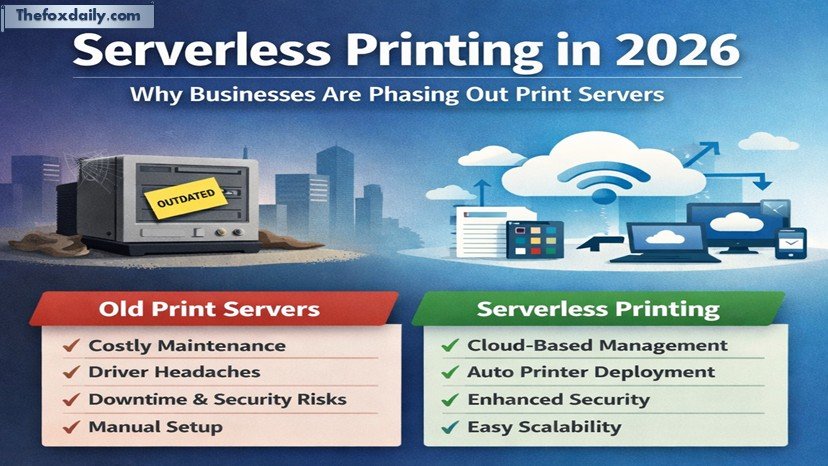
- The Evolution of Print Infrastructure
- The Hidden Costs of Legacy Print Servers
- The Opportunity Cost of Not Modernizing
- What Serverless Printing Actually Means
- Traditional vs Serverless Printing: A Comparison
- Why 2026 Is the Turning Point
- Real-World Benefits of Going Serverless
- Common Concerns About Serverless Printing
- A Strategic Opportunity for IT Leaders
- Conclusion: The Future of Printing Is Serverless
Across industries, IT leaders, system administrators, and Business decision-makers are rethinking how printing fits into modern Infrastructure. Traditionally, organizations have relied on on-premise print servers to manage queues, drivers, and device access. However, as we move into 2026, a clear shift is underway. Companies are increasingly transitioning to serverless, cloud-based printing solutions.
This transformation is happening globally, across enterprises, SMBs, Healthcare systems, Logistics networks, and hybrid workplaces. The driving forces are clear: reducing IT workload, improving Security, enabling remote access, and aligning with broader cloud strategies. Simply put, businesses are asking a practical question why maintain aging print servers when simpler, more scalable alternatives exist?
The answer lies not in abandoning print, but in modernizing it.
The Evolution of Print Infrastructure
For decades, print servers have quietly powered office environments. They were reliable, predictable, and deeply embedded in enterprise IT systems. But they were also designed for a different era one where employees worked primarily in offices, devices were standardized, and networks were static.
That world no longer exists.
Today’s workplaces are hybrid, device-diverse, and cloud-first. Employees print from laptops, tablets, and mobile devices, often from remote locations. Managing this complexity with legacy print servers introduces friction, inefficiency, and risk.
While on-premise servers are not inherently flawed, they struggle to keep up with modern demands. The issue is not functionality it’s adaptability.
The Hidden Costs of Legacy Print Servers
At first glance, print servers may seem inexpensive to maintain. Many organizations categorize them under routine IT operations. However, a closer look reveals a different story.
1. Manual Queue Management
Every time a user cannot locate or access a printer, IT teams must step in. This involves installing drivers, configuring queues, and troubleshooting connectivity issues. Multiply this across multiple locations and hundreds of users, and it becomes a continuous drain on resources.
2. Driver Complexity
Mixed operating systems and diverse printer models create a complicated ecosystem of drivers. Keeping everything compatible requires constant updates, testing, and maintenance. Even a minor mismatch can disrupt workflows.
3. Support Ticket Volume
“I hit print, but nothing happened.” This is one of the most common helpdesk complaints. Each ticket may seem minor, but collectively they consume significant time and skilled labor.
4. Security Risks
Outdated print servers can become weak points in an organization’s security posture. Unpatched software, exposed network shares, and legacy protocols increase vulnerability to attacks.
5. Downtime Impact
When a print server fails, the disruption is immediate. In environments like hospitals, logistics centers, or customer service operations, even brief downtime can halt critical processes.
These costs are often overlooked because they are distributed across different IT functions. But together, they form a substantial operational burden.
The Opportunity Cost of Not Modernizing
Beyond visible expenses, there is another factor that often goes unnoticed: opportunity cost.
Every year spent maintaining outdated infrastructure is a year without the benefits of modern systems.
Faster Deployment
Cloud-based solutions enable instant scalability. New offices, users, or workflows can be set up in minutes rather than days. This agility is essential in fast-moving markets.
Improved Productivity
When printing works seamlessly across devices and locations, employees spend less time troubleshooting and more time focusing on meaningful work.
Flexible Cost Models
Serverless systems typically follow usage-based pricing. Organizations pay for what they use, eliminating the need for over-provisioning hardware.
Legacy systems, in contrast, are rigid. They require manual scaling, ongoing patching, and continuous oversight.
What Serverless Printing Actually Means
The term “serverless” can be misleading. It does not mean printing without infrastructure it means removing the dependency on on-premise servers.
In a serverless model, print management is handled through a secure cloud platform. This centralizes control while eliminating the need for physical server maintenance.
Key Features of Serverless Printing
- Centralized Management: Administrators control printers, queues, and policies from a single dashboard.
- Automatic Deployment: Printers are assigned to users based on location, role, or device.
- Cross-Platform Compatibility: Works across different operating systems without complex driver configurations.
- Remote Accessibility: Users can print securely from any location.
- Enhanced Security: Modern encryption and authentication methods reduce risk.
This approach removes much of the manual effort traditionally associated with print management.
Traditional vs Serverless Printing: A Comparison
| Feature | Traditional Print Server | Serverless Printing |
|---|---|---|
| Infrastructure | On-premise hardware required | Cloud-based, no local servers |
| Setup Time | Manual, time-consuming | Automated, quick deployment |
| Scalability | Limited, hardware-dependent | Highly scalable |
| Maintenance | Continuous updates and patches | Managed by provider |
| Security | Dependent on internal controls | Advanced cloud security |
| User Experience | Inconsistent | Seamless and device-agnostic |
Why 2026 Is the Turning Point
Several factors are converging to make 2026 a critical year for print transformation.
1. End-of-Life Infrastructure
Many existing print servers are reaching the end of their lifecycle. Upgrading them requires investment in new hardware and software licenses.
2. Cloud-First Strategies
Organizations are already migrating applications and data to the cloud. Printing is one of the remaining components yet to be modernized.
3. Hybrid Work Models
Remote and flexible work arrangements demand printing solutions that are accessible from anywhere.
4. IT Resource Optimization
IT teams are under pressure to focus on strategic initiatives rather than routine maintenance tasks.
Together, these trends create a strong case for change.
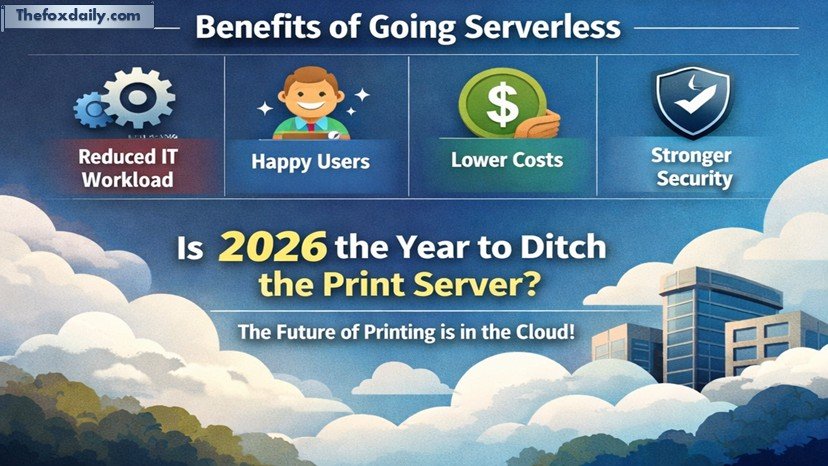
Real-World Benefits of Going Serverless
Organizations that adopt serverless printing often report immediate improvements.
Reduced IT Workload
Automating printer deployment and eliminating manual configurations significantly lowers support demands.
Improved User Satisfaction
Employees can print without interruptions, regardless of their location or device.
Cost Efficiency
Removing physical servers reduces capital expenditure and ongoing maintenance costs.
Stronger Security Posture
Cloud platforms offer built-in security features, including encryption and access controls.
These benefits align with broader business goals efficiency, scalability, and resilience.
Common Concerns About Serverless Printing
Despite its advantages, some organizations hesitate to make the switch. Common concerns include:
Loss of Control
In reality, centralized dashboards often provide greater visibility and control than traditional systems.
Reliability
Modern cloud platforms are designed for high availability, often exceeding on-premise uptime.
Migration Complexity
While transition requires planning, many solutions offer streamlined migration tools and support.
These concerns are valid but increasingly manageable with the maturity of cloud technologies.
A Strategic Opportunity for IT Leaders
Retiring print servers is not just a technical upgrade it is a strategic decision.
It allows organizations to:
- Simplify infrastructure
- Reduce operational overhead
- Improve user experience
- Align with digital transformation goals
In a landscape where efficiency and agility are critical, even seemingly small changes can have significant impact.
Conclusion: The Future of Printing Is Serverless
The shift away from traditional print servers is no longer a question of “if,” but “when.” As businesses move deeper into cloud-first strategies, maintaining legacy print infrastructure becomes increasingly difficult to justify.
Serverless printing offers a practical, scalable, and secure alternative. It reduces IT burden, enhances productivity, and prepares organizations for future growth.
Looking ahead, printing will continue to evolve alongside broader digital transformation efforts. The organizations that act now will not only reduce costs but also gain a competitive edge through improved efficiency and flexibility.
And let’s be honest if your print server has been quietly humming in a corner for years, it might finally be time to let it retire gracefully.
For breaking news and live news updates, like us on Facebook or follow us on Twitter and Instagram. Read more on Latest Technology on thefoxdaily.com.


COMMENTS 0