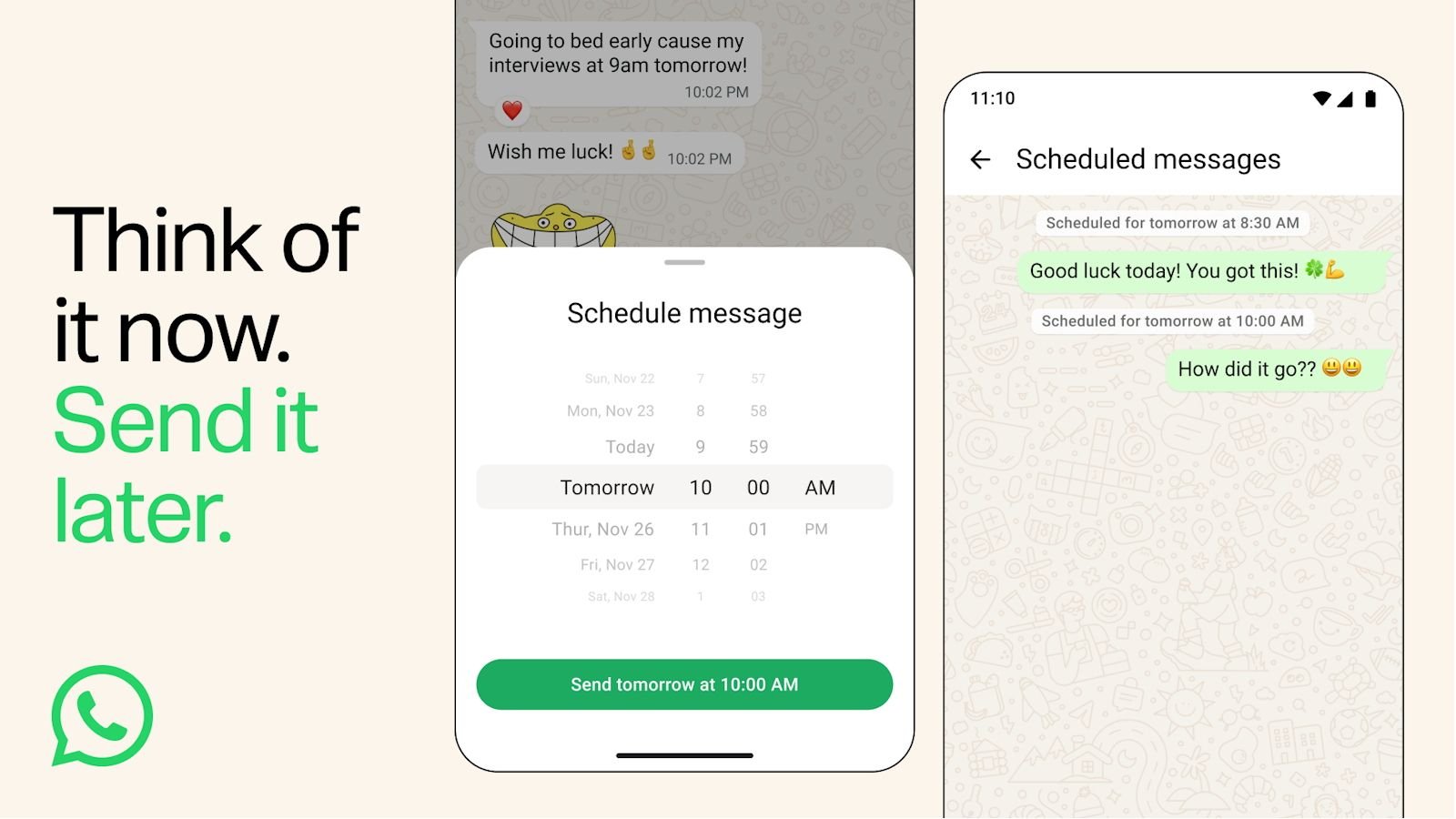
WhatsApp is rolling out a long-awaited message scheduling feature that allows users to write messages in advance and choose exactly when they should be delivered. The update supports both individual and group chats, making it easier to plan birthday wishes, work reminders, important announcements and personal messages without having to remember to send them manually.
Users can schedule text messages, photos and videos for delivery between 10 minutes and 14 days in the future. Once scheduled, messages are sent automatically, even if the sender’s phone is switched off or has run out of battery. WhatsApp also says scheduled messages remain protected by end-to-end encryption, just like ordinary conversations.
The addition addresses a long-standing gap in one of the world’s most widely used Messaging Apps. While users have relied on third-party applications and workarounds to schedule WhatsApp messages, those methods have often involved extra permissions, complicated setup processes or the requirement to keep a phone running. The native feature brings message scheduling directly into WhatsApp.
WhatsApp Message Scheduling: What the New Feature Offers
The new scheduling option lets users prepare a message at a convenient time and have WhatsApp deliver it later. Rather than waiting until a particular moment to open a conversation and press send, users can select the delivery date and time in advance.
The feature works in both individual and group chats, so it is not limited to personal conversations. Users can plan messages for family groups, workplace discussions, community chats and other conversations where timing matters.
WhatsApp supports several types of scheduled content:
- Text messages: Write a message and choose when it should reach the recipient.
- Photos: Schedule an image to be delivered later instead of sending it immediately.
- Videos: Prepare video messages in advance and set their delivery time.
- Group messages: Schedule messages for group conversations without needing to send them manually at the selected time.
The scheduling window starts at 10 minutes and extends to 14 days. This gives users flexibility for both short-term reminders and messages planned well ahead of time.
Importantly, recipients receive scheduled messages like ordinary WhatsApp messages. They do not see a special label indicating that the sender prepared the content earlier or selected a future delivery time.
How to Schedule a Message on WhatsApp
WhatsApp has designed the scheduling process to be straightforward. Users do not need to navigate through complicated settings or install another application. The option is accessed directly from the chat’s send button.
Step-by-Step Guide
- Step 1: Open WhatsApp on your device.
- Step 2: Enter the individual or group chat where you want to send the message.
- Step 3: Type your message in the message box. You can also prepare supported photos or videos.
- Step 4: Press and hold the send button instead of tapping it normally.
- Step 5: Select the date and time when you want the message to be delivered.
- Step 6: Confirm the scheduled delivery.
Once confirmed, WhatsApp saves the message for delivery at the selected time. You can leave the conversation and continue using the app normally. The message will be sent automatically when its scheduled time arrives.
For example, if you remember a friend’s birthday late at night but want to send wishes the following morning, you can prepare the message immediately and schedule it for the appropriate time. The same approach works for reminders, planned announcements and other messages that should arrive at a specific moment.
Can You View or Delete Scheduled WhatsApp Messages?
Scheduling a message does not mean losing control over it. WhatsApp also provides a way to view upcoming scheduled messages and delete them before delivery.
This is particularly useful when plans change or a message is no longer relevant. Instead of waiting for the scheduled time, users can check their pending messages and remove anything they no longer want to send.
Consider a situation where you schedule a meeting reminder for the following day but the meeting is cancelled. Being able to delete the pending message helps prevent an outdated reminder from reaching the group.
The ability to review scheduled messages also gives users a convenient way to check what they have planned. It reduces the risk of forgetting about messages created days earlier and makes the feature more practical for everyday communication.
Will WhatsApp Send Scheduled Messages If Your Phone Is Off?
One of the most useful aspects of WhatsApp’s new scheduling feature is that scheduled messages can be delivered even when the sender’s phone is switched off or its battery is empty.
This is an important difference compared with many older scheduling workarounds. Some third-party solutions depend on the sender’s phone being powered on, connected and available to perform the sending action at the selected time.
WhatsApp’s native implementation removes that particular limitation. Users can schedule a message, switch off their phone and still expect it to be delivered at the chosen time.
This makes the feature more dependable for messages that need to arrive at a specific hour. It is especially useful when travelling, sleeping, attending meetings or managing conversations across different time zones.
For example, someone preparing a message for a colleague in another country does not need to stay awake until the recipient’s working hours begin. They can schedule the message in advance and let WhatsApp handle the delivery.
Are Scheduled WhatsApp Messages End-to-End Encrypted?
Privacy is another important consideration when messages are prepared in advance. WhatsApp says scheduled messages retain the same end-to-end encryption protection as regular chats.
End-to-end encryption is designed to ensure that message content can be read only by the intended participants in a conversation. WhatsApp says that it cannot read the content of these encrypted messages, including those scheduled for future delivery.
This matters because scheduling involves storing a message until its delivery time. Users may reasonably want to know whether preparing a message in advance changes how their private conversations are protected.
According to WhatsApp, it does not. Scheduled messages remain within the app’s existing encrypted messaging system rather than becoming ordinary, unprotected messages simply because they are set to arrive later.
Users should still take normal precautions when managing their accounts and devices. Encryption protects message content in transit and within the supported messaging system, but it does not eliminate risks associated with compromised devices, account access or someone using an unlocked phone.
WhatsApp Tested Message Scheduling Before the Wider Rollout
The scheduling feature did not appear without an earlier testing period. WhatsApp had been developing and testing the functionality before beginning its wider release.
In October, the company started rolling out message scheduling to selected Android beta testers using WhatsApp beta version 2.26.40.7. The testing implementation used the same basic interaction now associated with the feature: users could press and hold the send button to choose a future delivery time.
Testing with a limited group of users allowed WhatsApp to evaluate the experience before making it more broadly available. The wider rollout now brings the capability beyond the initial beta-testing audience.
As with other WhatsApp updates, availability may depend on the rollout reaching a particular account or device. Users who do not immediately see the scheduling option may need to wait for the feature to become available to them.
Why Scheduled Messages Could Be Useful for Everyday WhatsApp Users
Message scheduling may appear to be a small addition, but it addresses several common situations in which users want to communicate at a particular time without being online when that moment arrives.
1. Birthday Wishes and Special Occasions
Birthdays and anniversaries are among the clearest uses for scheduled messaging. Users can prepare a greeting in advance and arrange for it to arrive at midnight or another meaningful time. This is particularly helpful when the recipient lives in a different time zone.
2. Work Reminders and Professional Communication
People often remember work-related messages outside normal office hours. Scheduling allows them to prepare a reminder when it comes to mind but deliver it during the recipient’s working day. It can help avoid unnecessary late-night notifications while keeping important communication on schedule.
3. Group Announcements
Group administrators and regular participants can use scheduled messages to plan announcements, event reminders and updates. Instead of relying on someone to remember to post at the right time, the message can be prepared beforehand.
4. Messages Across Different Time Zones
Families, friends and professional teams are increasingly spread across countries. A message sent immediately may arrive at an inconvenient hour for the recipient. Scheduling gives the sender more control over delivery time without requiring them to adjust their own routine.
5. Important Personal Reminders
Users can also prepare messages for upcoming events, appointments or personal commitments. Scheduling a message to a group or another person can make it easier to communicate information at the right moment.
WhatsApp Is Adding More Features Beyond Message Scheduling
The arrival of scheduled messages is part of a broader series of updates focused on improving everyday conversations. WhatsApp has been introducing additional tools designed to make group chats more useful and account management more secure.
Among the recent additions are @all mentions and smarter polls for group conversations. These features aim to improve how people share information, get attention and make decisions within busy groups.
The company has also been working on account security improvements. As WhatsApp becomes an increasingly important communication platform for personal and professional use, security features remain a significant part of its development priorities.
These updates suggest that WhatsApp is continuing to focus on practical improvements to its core messaging experience rather than relying only on major visual changes. Message scheduling fits naturally into that strategy because it makes an existing activity more convenient without requiring users to learn an entirely new way of communicating.
WhatsApp Is Also Testing Zaps and Chat Previews
Message scheduling is not the only feature being explored by WhatsApp. The company is also testing other changes that could affect how users share media and interact with incoming messages.
Zaps for Disappearing Photos and Videos
WhatsApp is testing a feature called Zaps for disappearing photos and videos. The functionality is aimed at temporary media sharing, although further details about its availability and final behaviour remain limited.
Disappearing media is already an important part of private messaging, particularly for users who do not want every shared photo or video to remain permanently available in a conversation. Additional controls could make temporary sharing more flexible.
Chat Previews Without Triggering Blue Ticks
Another feature being explored could allow users to preview WhatsApp chats without triggering the familiar blue read receipts. Blue ticks currently indicate that a message has been read when read receipts are enabled, so a preview option could offer more flexibility over how users manage incoming conversations.
However, this functionality remains under testing rather than being a confirmed part of the scheduled messaging rollout. Its final design and availability may change before any wider release.
WhatsApp Scheduled Messages: What Users Should Know
WhatsApp’s new feature makes it possible to prepare messages in advance without relying on external scheduling applications. Here are the main details users should remember:
- Supported chats: Individual and group conversations.
- Supported content: Text messages, photos and videos.
- Scheduling window: From 10 minutes to 14 days ahead.
- How to schedule: Press and hold the send button and select a delivery time.
- Automatic delivery: Messages can be sent even when the sender’s phone is switched off or out of battery.
- Privacy: Scheduled messages remain end-to-end encrypted.
- Message management: Users can view upcoming scheduled messages and delete them before delivery.
- Recipient experience: Scheduled messages arrive like normal messages without a special scheduling label.
WhatsApp Message Scheduling Is a Small Update With Big Practical Benefits
WhatsApp’s scheduled messaging feature may not completely change how people communicate, but it removes a frustrating limitation that users have dealt with for years. Being able to write a message now and have it arrive later makes the app more convenient for personal greetings, professional reminders and group announcements.
The ability to schedule messages for up to 14 days, combined with automatic delivery when a phone is switched off and existing end-to-end encryption, makes the feature more useful than many traditional workarounds. Users also retain control through the option to review and delete pending messages.
As the rollout reaches more accounts, scheduled messaging could become a regular part of how people use WhatsApp. For anyone who has ever forgotten a birthday greeting, sent a late-night work message or needed to communicate across time zones, this is one of the app’s more practical additions.
For breaking news and live news updates, like us on Facebook or follow us on Twitter and Instagram. Read more on Latest Technology on thefoxdaily.com.






COMMENTS 0