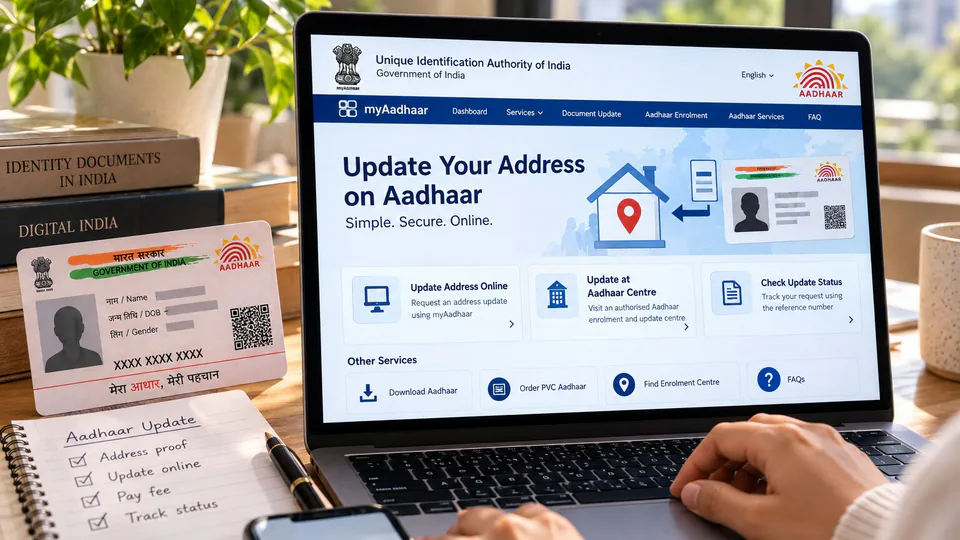
Updating your address on Aadhaar is an important step when you move to a new home or need to correct your existing residential details. The Unique Identification Authority of India (UIDAI), which manages the Aadhaar system, provides online and offline options for residents to request an address update.
Aadhaar holders can use the official myAadhaar portal to submit an online request, provided they meet the applicable requirements. Those who cannot complete the process online can visit an authorised Aadhaar Enrolment and Update Centre or Aadhaar Seva Kendra for assistance.
The process generally involves entering the new residential address, providing an accepted Proof of Address (PoA) document where required, and submitting the request for verification. Applicants should carefully review their details before submission because an application does not automatically guarantee approval.
Before starting, check the official UIDAI website for the latest instructions, accepted documents, applicable fees and available services. This guide explains who can request an Aadhaar address update, what documents may be required, how to apply online or offline, and how to track the application’s status.
Who Can Update Their Address on Aadhaar?
Any existing Aadhaar holder whose recorded residential address needs to be changed or corrected can explore the address-update service. This may apply to people who have moved to a different house, relocated to another city, or discovered an error in their existing address details.
The online process generally requires access to the mobile number registered with Aadhaar because an OTP, or one-time password, is used to verify the applicant during login. An OTP is a temporary security code that helps confirm access to the account.
If you no longer have access to your registered mobile number or cannot receive the OTP, you may need to visit an authorised Aadhaar centre to find out how to proceed. The available options depend on UIDAI’s current procedures and your individual circumstances.
UIDAI also provides procedures for eligible residents who need to use a qualifying family member’s address rather than their own Proof of Address document. This option is subject to specific eligibility conditions and documentation requirements, so applicants should consult the official instructions before using it.
Use only UIDAI’s official websites to begin the process:
- UIDAI official website: https://uidai.gov.in/
- myAadhaar portal: https://myaadhaar.uidai.gov.in/
What Documents Are Required to Update Aadhaar Address?
Applicants updating their residential address using their own documents generally need an accepted Proof of Address (PoA). This document must support the new address they want recorded in Aadhaar.
UIDAI maintains an official list of acceptable supporting documents. Depending on the applicant’s circumstances, eligible documents may include government-issued records, utility bills and certain financial or residential documents. Not every document displaying a residential address will necessarily qualify.
Before uploading a document or presenting it at an Aadhaar centre, check the following details:
- Accepted document: Confirm that the document appears on UIDAI’s current list of acceptable supporting documents.
- Correct personal details: Ensure that the name and address are consistent with the information being submitted.
- Validity: Check that the document meets UIDAI’s requirements and has not expired, where an expiry date applies.
- Readability: Make sure the document is complete, clear and legible, including all relevant pages or details.
- Correct address: Verify that the document supports the residential address you want to add to Aadhaar.
If you do not have an accepted address document in your own name, check whether UIDAI’s Head of Family (HoF)-based address update procedure applies to you. Under this route, an eligible family member can support the address update, subject to the applicable relationship, documentation and approval requirements.
Always refer to UIDAI’s official list of acceptable documents before applying. Submitting an unsuitable, incomplete or unclear document can result in a request being rejected or delayed.
How to Update Your Aadhaar Address Online: Step-by-Step Guide
The myAadhaar portal allows eligible Aadhaar holders to submit an address-update request online. Before beginning, keep your Aadhaar details, registered mobile phone and supporting address document ready.
Follow these steps to submit your request:
Step 1: Visit the official myAadhaar portal
Open https://myaadhaar.uidai.gov.in/ in your browser. Make sure you are using the official UIDAI website rather than a third-party service that may charge additional fees or request unnecessary personal information.
Step 2: Log in to your account
Enter your Aadhaar details as requested and complete the required verification. For the online process, access to the mobile number registered with Aadhaar is generally required to receive an OTP.
Step 3: Select the address-update service
Once logged in, locate the address-update option and follow the instructions displayed on the portal. Read the service requirements carefully before proceeding.
Step 4: Enter your new residential address
Fill in the requested address details accurately. Check the house or flat number, building name, street, locality, city or town, state and PIN code wherever applicable.
Step 5: Upload an accepted Proof of Address
Upload the supporting document in the format and size accepted by the portal. Ensure that the document is complete and that the relevant address information is clearly visible. If you are using an eligible family-member-based procedure, follow the specific instructions for that method instead.
Step 6: Review the information
Check the completed form and the address displayed in the preview, if provided. Pay particular attention to spelling, numbers and PIN code details. Correct any mistakes before submitting the request.
Step 7: Pay the applicable fee
Complete the payment shown by the official portal. UIDAI’s current service information lists a fee of ₹75 for an address update. Check the amount displayed during the application because service charges and concessions may change.
Step 8: Save the acknowledgement
After submitting the request, save the acknowledgement or Service Request Number (SRN) provided by the system. This reference can be used to track the progress of your application.
Submitting the request does not mean that the address has already been updated. UIDAI must process the application, and approval depends on the applicable verification requirements.
Can You Update Your Aadhaar Address Using a Family Member’s Address?
UIDAI provides a Head of Family-based procedure for eligible residents who need to update their address using a qualifying family member’s address. This can be useful when the applicant does not have an accepted Proof of Address document in their own name.
The procedure is subject to eligibility requirements. The person acting as the Head of Family must meet UIDAI’s applicable conditions, and the relationship between the applicant and that family member must be supported in the manner prescribed by the authority.
Depending on the process being used, the application may require the family member’s Aadhaar details, proof of the relationship and approval from the Head of Family. Applicants should carefully follow the instructions displayed by UIDAI rather than assuming that any relative’s address can automatically be used.
Before selecting this option, check the current Head of Family-based address-update guidelines on the official UIDAI website. This will help you determine whether your relationship qualifies and what evidence or consent is required.
How to Update Your Aadhaar Address Offline
If you cannot complete the online process, you can visit an authorised Aadhaar Enrolment and Update Centre or Aadhaar Seva Kendra. The offline route may be more convenient for applicants who need assistance with the form, cannot access their registered mobile number or prefer to submit documents in person.
Here is how the offline process generally works:
Step 1: Locate an authorised Aadhaar centre
Visit UIDAI’s official website to find an authorised enrolment or update centre. Check the location and available services before travelling.
Step 2: Carry your Aadhaar details and supporting documents
Take your Aadhaar details and the original documents required to support the new address. Check UIDAI’s current list of acceptable documents before your visit to avoid carrying unsuitable paperwork.
Step 3: Request an address update
Inform the operator that you want to change the residential address recorded in Aadhaar. Follow the centre’s instructions and provide the information and documents requested for the application.
Step 4: Check the details entered
Review the address information entered by the operator before confirming the request. Ensure that the spelling, house number, locality and PIN code are correct.
Step 5: Pay the applicable fee
Pay the prescribed charge for the service. UIDAI lists ₹75 for a separate demographic update at an Aadhaar centre. Ask for clarification if the amount requested differs from the official fee schedule.
Step 6: Collect the acknowledgement
Keep the acknowledgement slip or update reference number provided by the centre. You may need this information to check the status of the application later.
Visiting an Aadhaar centre does not guarantee immediate approval. The submitted details and documents remain subject to the applicable verification process.
Aadhaar Address Update Fee: How Much Does It Cost?
UIDAI’s current service information lists a fee of ₹75 for an address update. The applicable charge depends on the service being requested and the method used.
For a separate demographic update at an Aadhaar centre, the listed fee is ₹75. Demographic information includes details such as name, address, date of birth, gender, mobile number and email address.
It is important to distinguish an address update from a document-only update. A document-only update involves submitting supporting identity or address documents, whereas an address update changes the residential address recorded in Aadhaar.
UIDAI may offer temporary fee concessions for specific services. For example, its official service information lists a temporary waiver for certain document-update requests submitted through the myAadhaar portal until June 14, 2027. Such concessions should not automatically be assumed to apply to a separate address-update request.
Before making a payment, check the official UIDAI website and the fee displayed for the particular service you are using. Avoid paying unofficial agents or relying on outdated fee information found on third-party websites.
How to Check Your Aadhaar Address Update Status
After submitting an address-update request, you can use the status-checking facility available through the myAadhaar portal to monitor its progress.
Follow these steps:
Step 1: Visit the official myAadhaar portal at https://myaadhaar.uidai.gov.in/.
Step 2: Locate the option for checking the status of an Aadhaar update request.
Step 3: Enter the Service Request Number, acknowledgement reference or other information requested by the portal.
Step 4: Follow the on-screen instructions to view the current status of your application.
Keep the acknowledgement slip safe until the request has been processed. If the application is rejected, review the reason provided and follow UIDAI’s instructions before submitting another request.
Processing times can vary depending on the request and verification requirements. Do not assume that your address has been changed merely because the application has been submitted or the fee has been paid.
Common Mistakes to Avoid When Updating Your Aadhaar Address
Small errors can complicate the address-update process. Checking the application carefully before submission can help reduce the risk of delays or rejection.
- Entering an incorrect PIN code: Verify the PIN code and locality before submitting the form.
- Uploading an unsuitable document: Confirm that the document is accepted by UIDAI for Proof of Address.
- Submitting an unclear scan: Ensure that the complete document is readable and that the relevant information is visible.
- Using an inaccessible registered mobile number: Check whether you can receive the OTP required for the online process. If not, explore the authorised offline route.
- Ignoring the application reference: Save the acknowledgement or SRN so that you can check the status later.
- Assuming submission means approval: Wait for UIDAI to process the request and check the final status.
- Using unofficial websites: Enter Aadhaar details and upload documents only through official UIDAI services.
Important Things to Know Before Applying
Before beginning an Aadhaar address update, confirm that the new address is supported by the required documents and that you can complete the verification process. If you are using the online portal, keep your registered mobile phone available and ensure that your supporting document is ready to upload.
If you do not have your own Proof of Address document, check whether the Head of Family-based procedure is available for your circumstances. If you cannot complete the online process, an authorised Aadhaar centre can explain the applicable procedure and documentation requirements.
For official assistance, visit https://uidai.gov.in/ or use the myAadhaar portal at https://myaadhaar.uidai.gov.in/. UIDAI also provides assistance through its helpline at 1947.
Updating your address through the official process helps ensure that your Aadhaar records reflect your current residential details. By checking the documentation requirements, entering the new address carefully, paying the prescribed fee and keeping the acknowledgement reference, you can follow the process with fewer avoidable errors.
For breaking news and live news updates, like us on Facebook or follow us on Twitter and Instagram. Read more on Latest Education on thefoxdaily.com.






COMMENTS 0