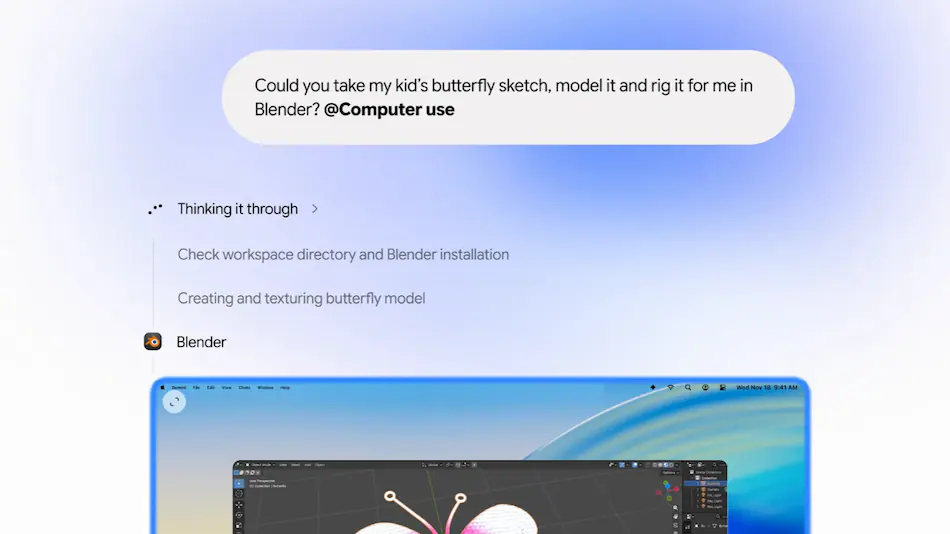
Google Gemini for Mac is gaining a Computer Use feature that allows the AI assistant to interact with desktop applications, navigate websites, fill out forms and complete multi-step workflows on a user’s behalf. Announced by Google on Thursday, the feature is designed to reduce repetitive manual work by allowing Gemini to click through menus, enter information into fields and move between supported applications without requiring users to perform every action themselves.
Computer Use is rolling out in English in the United States through the Gemini app for Mac. It extends Gemini beyond answering questions and generating content, bringing it closer to an AI assistant capable of carrying out practical tasks across a computer’s desktop environment.
The feature could be particularly useful for workflows involving multiple files, applications and websites. Instead of manually collecting information from documents, transferring details into online forms and organising the results, users can describe the desired outcome and let Gemini handle much of the process.
What Is Computer Use in Google Gemini for Mac?
Computer Use is an agentic AI capability that allows Gemini to interact with supported desktop software and websites through simulated computer actions. Rather than simply providing instructions for completing a task, the assistant can navigate interfaces, click buttons, type text and move through different steps to accomplish the requested work.
For example, a user could ask Gemini to extract information from a collection of PDF documents and enter the relevant details into an online form. Gemini can read the available information, identify the fields that need to be completed and perform the required interactions.
Google says the feature can work across local files, desktop applications and the web. This makes it useful for tasks that involve moving information between different environments rather than working inside a single application.
The main idea is to reduce the time spent on repetitive computer operations. Users can explain what they want to achieve in natural language, while Gemini handles supported interactions needed to move the task forward.
Five Ways Gemini Computer Use Could Automate Everyday Work
Google has demonstrated several potential applications for Computer Use, covering creative projects, document processing, business reporting and online selling. These examples show how desktop automation could become useful beyond simple browser interactions.
1. Batch Editing Photos and Managing Creative Projects
Creative professionals often repeat similar editing operations across large collections of images. Adjusting colours, applying consistent visual settings and preparing multiple files can consume considerable time, particularly when a project contains dozens or hundreds of photographs.
With Computer Use, Gemini can help automate parts of these workflows by interacting with supported design software. Google describes an example in which the assistant can batch colour-grade photographs, potentially reducing the need to repeat similar editing actions manually.
The company has also highlighted more complex creative tasks, such as helping users configure 3D scenes. These workflows can involve navigating several menus and adjusting multiple settings, making them suitable examples of tasks that benefit from desktop interaction.
However, automation does not necessarily remove the need for creative judgement. Users may still need to review the finished images, adjust visual details and confirm that the results match their intended style.
2. Extracting Information From PDFs and Filling Out Forms
One of the more practical examples involves processing shipping information stored in local PDF files. Businesses and individuals frequently receive documents containing package weights, dimensions, delivery addresses and other details required to obtain shipping quotes.
Normally, someone would need to open each document, locate the relevant information and manually transfer it into a shipping company’s online form. This process becomes especially repetitive when several packages need to be processed.
Gemini’s Computer Use feature can help by extracting the required information from locally stored PDFs and entering it into shipping quote forms. The assistant can navigate between the documents and the relevant website rather than requiring users to copy and paste every field themselves.
This type of automation could be useful for small businesses, online sellers and people who regularly manage shipments. It also illustrates how AI agents can connect information stored on a computer with actions performed through web applications.
3. Turning Dashboard Data Into Google Slides Presentations
Preparing business presentations often requires collecting information from multiple dashboards, comparing performance across regions and arranging the findings into a clear format.
Google says Gemini can gather information from live dashboards, including metrics and screenshots from different regions, and use the collected material to create a presentation in Google Slides.
Such a workflow could reduce the time required to gather figures and organise presentation material. Instead of manually switching between dashboards and transferring information into individual slides, users can ask Gemini to handle supported parts of the process.
There is still an important distinction between creating a presentation and validating its contents. Users should review figures, check whether the correct reporting periods and regions have been selected, and confirm that the final slides accurately represent the underlying data.
4. Researching Products and Preparing Resale Listings
Another example focuses on people who sell used products through online marketplaces. Preparing a listing usually involves examining product photographs, identifying the item, researching comparable prices and writing a description before entering the information into a resale platform.
Gemini can assist with several of these steps. It can analyse photographs stored in a local folder, research prices, organise product information and prepare listings on supported resale platforms.
This could make managing multiple resale items less time-consuming, particularly for users who regularly sell electronics, household goods, clothing or other second-hand products.
Nevertheless, sellers should check product descriptions, condition details and suggested prices before publishing anything. An AI assistant may misidentify an item or overlook damage that is visible in a photograph. Human review remains important when accuracy affects a transaction.
5. Handling Multi-Step Tasks Across Desktop Applications and Websites
The broader purpose of Computer Use is to connect individual computer operations into a complete workflow. A task might begin with information stored in a local folder, continue inside a desktop application and finish with data entered into a website.
Previously, users generally had to coordinate these steps themselves, moving between windows and transferring information manually. Gemini aims to take over supported parts of that process after receiving a natural-language instruction.
This approach could be useful for administrative work, research, document preparation and other activities that involve several applications. The feature’s value will depend on how reliably Gemini can understand the task, navigate different interfaces and recover when an unexpected screen or error appears.
Gemini Runs in a Background Window With a Live Preview
One notable part of Google’s implementation is how Computer Use operates alongside the user’s normal desktop activity. According to the company, the feature runs in an isolated background window while displaying a live preview of its actions inside the Gemini chat.
This arrangement is intended to let users monitor the assistant without handing over their main desktop or cursor. Someone could continue typing, working on a design or participating in a call while Gemini carries out an automated task in the separate environment.
The live preview also provides visibility into what the assistant is doing. Users can observe its progress rather than waiting until the entire workflow finishes to discover what happened.
Keeping the automation in a separate window could make the feature more convenient for people who need to continue working while an AI agent handles background operations. However, the actual experience may depend on application compatibility, task complexity and how well Gemini handles unexpected interface changes.
Google Adds Privacy and Safety Controls to Computer Use
Allowing an AI assistant to interact with desktop applications introduces additional privacy and security considerations. Unlike a conventional chatbot, a computer-use agent may access files, interact with websites and enter information into forms. That makes control over its permissions and actions particularly important.
Google has outlined several safeguards for Gemini Computer Use:
- Application access controls: Users can choose which applications Gemini is allowed to access.
- Live monitoring: The assistant’s actions can be watched through the preview in the Gemini chat.
- Pause controls: Users can pause an automated workflow when necessary.
- Approval for key actions: Important actions require user approval before they are carried out.
These controls are intended to keep users involved while allowing the assistant to perform routine operations. They are particularly relevant when a task involves sensitive documents, personal information or online services.
Users should still review the instructions they give Gemini and pay attention to the information being accessed. Before allowing an automated workflow to interact with an account or submit information online, it is sensible to confirm that the requested action and destination are correct.
Human approval is also important because an AI agent can misunderstand instructions or make mistakes when interpreting information. A preview and pause option provide additional oversight, but they do not eliminate the need to check the results.
Gemini Computer Use Availability: Who Can Access It?
Google says Computer Use is rolling out in English in the United States through the Gemini app for Mac. The announcement does not establish general availability across every country, language or desktop platform.
This means Mac users outside the United States, including those in India, should not assume that the feature is already available on their devices. Its availability may depend on Google’s rollout schedule and the eligibility of individual users.
Google has not provided a confirmed worldwide release timeline in the supplied announcement. Users interested in trying the feature should check the Gemini app for Mac and Google’s official feature announcements for availability updates.
How Gemini Computer Use Fits Into Google’s AI Strategy
The Mac expansion reflects a broader shift in how Google is developing Gemini. The company is increasingly positioning its AI assistant as a tool that can complete tasks rather than simply generate responses to questions.
Traditional chatbots mainly operate through conversations. Users ask questions, receive information or request generated content, and then carry out the recommended actions themselves. Agentic AI systems aim to close that gap by performing some of the actions required to reach a particular outcome.
Computer Use takes this approach into the desktop environment. It gives Gemini a way to interact with applications and websites, potentially allowing it to coordinate work that previously required users to move between several different tools.
Google has also been expanding Gemini’s task-handling capabilities in India and other markets, including features related to shopping, appointment bookings and everyday activities. The Mac announcement extends this wider direction into desktop productivity.
The longer-term opportunity is significant. If AI assistants become reliable at handling routine tasks across different applications, they could change how people organise information, manage administrative work and use desktop software.
How Gemini Computer Use Compares With Traditional AI Assistance
The biggest difference between conventional AI assistance and computer-use automation is the ability to act inside software. A traditional chatbot can explain how to complete a task, suggest the information to enter or generate text for a form. A computer-use agent can potentially perform supported steps through the application’s interface.
For example, a user asking a conventional chatbot to prepare a shipping quote would generally receive instructions or a list of details to enter. With Computer Use, Gemini can work through supported document and website interactions to help complete the process.
This does not mean every task can be fully automated. Some applications may not be supported, certain actions may require approval, and complex workflows can still need human intervention. The distinction is that Gemini is being designed to carry out parts of the work rather than stopping at recommendations.
What Could Gemini Computer Use Mean for Mac Users?
For Mac users, the feature could make everyday computer work more efficient, particularly when tasks involve repetitive data entry or moving information between applications.
Small businesses could potentially use it to organise product information, prepare shipping forms and manage online listings. Office workers could benefit from assistance with dashboard research and presentation preparation. Creative professionals may find value in automating repetitive editing operations.
However, the usefulness of these capabilities will depend on reliability. An AI assistant must understand instructions, recognise the correct interface elements and enter information into the right fields. Even a small mistake can create problems when a workflow involves financial details, customer information or business records.
Google’s use of a background window, live preview and approval controls addresses some of the practical concerns surrounding desktop automation. The next important test will be how well Gemini performs across different applications and increasingly complicated workflows.
Frequently Asked Questions About Google Gemini Computer Use
1. What is Computer Use in Google Gemini for Mac?
Computer Use is an AI Automation feature that allows Gemini to interact with supported desktop applications and websites. It can click menus, type into fields, navigate interfaces and complete multi-step tasks based on user instructions.
2. Can Gemini fill out online forms automatically?
Yes. Google says Gemini can extract information from local files, including PDF documents, and use those details to fill out supported online forms, such as shipping quote forms.
3. Is Gemini Computer Use available in India?
The announced rollout is in English in the United States through the Gemini app for Mac. Google has not confirmed general availability in India in the supplied announcement.
4. Can Gemini use desktop applications on a Mac?
Google says Computer Use can interact with supported desktop software, local files and websites. Its capabilities include clicking, typing and navigating menus to complete supported workflows.
5. Can users monitor Gemini while it performs tasks?
Yes. Computer Use reportedly runs in an isolated background window, with a live preview displayed in the Gemini chat so users can monitor the assistant’s actions.
6. Can users stop Gemini during an automated task?
Yes. Google says users can pause the process whenever necessary. The feature also includes user approval requirements for key actions.
7. What tasks can Gemini Computer Use automate?
Google has highlighted photo colour-grading, 3D scene setup, extracting information from PDFs, filling shipping forms, collecting dashboard information, creating Google Slides presentations and preparing online resale listings.
8. Is Computer Use available on Windows?
The announcement discussed here covers the Gemini app for Mac. It does not confirm a Windows rollout or provide a release date for other desktop platforms.
The Bigger Picture
Google Gemini’s Computer Use feature represents another step towards AI assistants that can operate software instead of simply explaining how to use it. By combining local file access, desktop application interactions and website navigation, Google is targeting workflows that often involve repetitive actions across multiple tools.
The feature’s background operation and live preview could make desktop automation more practical, while application permissions, pause controls and approval requirements give users ways to maintain oversight. For now, its availability is limited to an English-language rollout in the United States through the Gemini app for Mac.
Whether Computer Use becomes a genuinely useful everyday assistant will ultimately depend on its accuracy, application compatibility and ability to handle complex tasks safely. If Google can deliver consistent performance, Gemini could become more than a conversational assistant: it could become an active part of how people work on their computers.
For breaking news and live news updates, like us on Facebook or follow us on Twitter and Instagram. Read more on Latest Technology on thefoxdaily.com.






COMMENTS 0