The Asus ExpertBook P5 P5405CAA is designed for professionals who need a dependable laptop for everyday productivity, multitasking and virtual meetings. Powered by an Intel Core Ultra 7 356H processor and paired with 32GB RAM and a 1TB SSD, it promises enough hardware capacity to handle demanding office routines without constantly struggling with multiple applications.
Asus has also added productivity-focused software features through MyExpert and AI ExpertMeet, bringing tools such as AI-generated meeting minutes and translated subtitles into the experience. These additions reflect the growing importance of artificial intelligence in workplace computing, where saving time and simplifying routine tasks can be more valuable than having features that look impressive only on a specification sheet.
But a powerful processor and generous memory are only part of what makes a business laptop useful. Keyboard comfort, display quality, connectivity, portability and software experience also matter when a machine is expected to support several hours of work every day. After looking at the ExpertBook P5’s design, hardware and productivity features, the central question is whether it offers enough to justify consideration beyond its specifications.
Asus ExpertBook P5: Design and Build
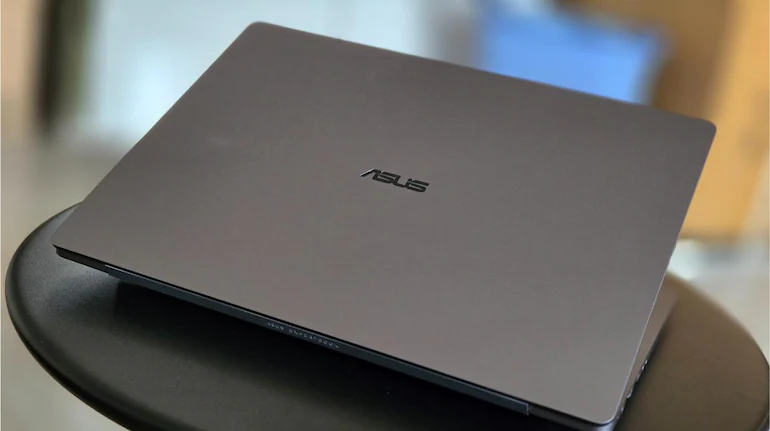
The Asus ExpertBook P5 follows a restrained design approach rather than trying to stand out with an unconventional appearance. Its grey finish, understated Asus branding and traditional laptop form give it a professional look that fits naturally into an office, meeting room or business environment.
This design choice makes sense for the audience Asus is targeting. A work laptop does not necessarily need aggressive styling or decorative elements. It needs to look appropriate in professional settings while remaining practical for everyday use.
The keyboard deck follows a familiar layout, with a backlit keyboard and dedicated function keys. For anyone who spends a large part of the day writing reports, preparing presentations, responding to emails or working with spreadsheets, the keyboard is one of the most frequently used parts of the machine.
The backlighting is particularly useful when working in dimly lit environments or during late-night sessions. It makes the keys easier to identify without requiring additional lighting.
The large touchpad is another practical feature. It offers enough room for everyday navigation and supports multi-finger gestures, making it easier to switch between applications, scroll through documents and manage windows. Its responsiveness and smooth movement contribute to a comfortable navigation experience.
Users who regularly work with detailed spreadsheets, image-editing applications or precision-heavy software may still prefer an external mouse. However, the built-in touchpad is capable enough for routine office tasks.
Overall, Asus has prioritised functionality over visual experimentation. The result is a laptop that looks professional and is designed around the everyday requirements of its intended users.
Performance: Intel Core Ultra 7 356H and 32GB RAM
Performance is one of the ExpertBook P5’s strongest selling points. The laptop combines an Intel Core Ultra 7 356H processor with 32GB of RAM running at 5600MT/s and a 1TB SSD. This configuration is aimed at people who regularly work across several applications rather than concentrating on a single task.
Consider a typical office workload. A professional might have 15 browser tabs open while working on a Word document, managing an Excel spreadsheet, checking Outlook emails and keeping Microsoft Teams ready for an upcoming meeting. An occasional image-editing application or presentation tool could add to the workload.
Running these applications together places demands on system memory as well as the processor. The 32GB RAM configuration provides substantial headroom for multitasking, reducing the need to repeatedly close applications simply to keep the system responsive.
This is particularly useful for professionals whose work involves research, writing, data management and frequent application switching. Journalists, business users, researchers and office employees can benefit from having several documents and browser windows available simultaneously.
The 1TB SSD also provides generous storage capacity for work documents, presentations, downloaded files, software and other everyday data. Solid-state storage contributes to a responsive computing experience, particularly when starting applications and accessing files.
Another advantage of this configuration is its suitability for people who intend to keep their laptop for several years. While future software requirements can change, starting with 32GB RAM gives users more flexibility than a basic memory configuration.
However, it is important to understand the laptop’s intended performance category. The integrated Intel graphics make the ExpertBook P5 better suited to general productivity and everyday creative tasks than demanding gaming or graphics-intensive professional workloads. Users who regularly edit complex videos, work with advanced 3D applications or depend on GPU acceleration should consider a machine with a more powerful dedicated graphics solution.
AI ExpertMeet: AI Features Focused on Virtual Meetings
Artificial intelligence has become an increasingly prominent part of the laptop market, but the usefulness of AI features depends on whether they solve actual problems. Asus approaches this through AI ExpertMeet, a software package focused primarily on virtual meetings and professional communication.
AI ExpertMeet includes features such as AI meeting minutes, translated subtitles and watermarks. These tools are intended to make online meetings easier to manage, particularly for people who spend a significant portion of their working day communicating with colleagues, clients or business partners remotely.
AI-generated meeting minutes could help users revisit important discussion points without manually going through an entire meeting recording. This can be useful when several meetings take place throughout the day and employees need to keep track of decisions, responsibilities and follow-up tasks.
Translated subtitles offer another potentially useful feature. In workplaces involving international teams or participants who speak different languages, translated captions can help make discussions easier to follow.
Watermark functionality also adds a layer of control to meeting-related content, depending on how it is used within a particular workflow.
These features are relevant because virtual meetings are no longer limited to occasional office calls. They have become a routine part of hybrid working, remote collaboration and business communication.
However, AI tools should not be judged simply by the number of features listed in their software menu. Their real value depends on accuracy, language support, ease of use and compatibility with existing meeting workflows. Meeting summaries, for example, are useful only when they correctly capture the important points of a discussion.
For that reason, AI ExpertMeet is best viewed as a productivity addition rather than the main reason to purchase the ExpertBook P5.
Asus MyExpert: Additional Productivity Tools
Alongside AI ExpertMeet, Asus includes its MyExpert software to bring additional productivity-oriented tools into the laptop experience.
The broader idea is to make useful assistance available within the business laptop environment rather than requiring users to search for separate applications for every task. For professionals who spend much of their day working on documents, managing information and switching between activities, a more integrated software experience can be convenient.
Nevertheless, the usefulness of MyExpert will depend on which tools users actually need and how smoothly they fit into their daily routines. Software features that are rarely used do little to improve the overall value of a laptop.
The important point is that Asus has focused its AI-related additions on workplace productivity. Rather than treating artificial intelligence as a marketing label, the company is attempting to connect it with practical activities such as meetings and everyday work.
Display and Webcam: Built for Everyday Office Work
The display is one of the most important parts of any laptop because users spend hours looking at it while reading documents, browsing websites, preparing presentations and attending video calls.
The ExpertBook P5’s display is positioned around conventional productivity requirements. It is intended for everyday professional tasks rather than serving as a specialised screen for high-end creative work or entertainment.
For office users, the practical experience matters more than specifications alone. Text should remain comfortable to read, documents should be easy to review and the screen should support extended working sessions.
The webcam is another important component, particularly as hybrid and remote working have made video calls a regular part of professional life. The centrally positioned camera supports the laptop’s meeting-focused purpose.
Asus has also included a physical webcam privacy shutter. This allows users to cover the camera when it is not required, providing a straightforward way to prevent unintended camera access.
For professionals who frequently participate in online meetings but also value privacy outside those sessions, this is a useful addition.
Connectivity: Practical Ports for Office and Business Use
Connectivity is an area where a business laptop needs to be practical. Users should be able to connect external displays, transfer files and attach accessories without carrying a collection of adapters.
The Asus ExpertBook P5 offers a selection of physical ports, including USB Type-A, USB Type-C, HDMI, Ethernet and a 3.5mm audio jack.
USB Type-A remains useful for connecting conventional accessories and storage devices. USB Type-C adds flexibility for compatible peripherals and modern connectivity requirements, while HDMI makes it easier to connect an external monitor or projector.
The inclusion of Ethernet is particularly relevant in office environments where wired networking is preferred. It can also be convenient when working in locations where wireless connectivity is unreliable or restricted.
The 3.5mm audio jack provides an option for wired headphones and headsets, which can be useful during calls or when listening to audio without relying on wireless accessories.
These ports may not attract as much attention as the processor or AI features, but they contribute directly to everyday convenience. For a laptop intended for professional use, reducing dependence on external adapters is a meaningful advantage.
Who Should Buy the Asus ExpertBook P5?
The ExpertBook P5 is primarily aimed at professionals who need a laptop for multitasking, office applications, research and communication. Its combination of an Intel Core Ultra 7 356H processor, 32GB RAM and 1TB SSD makes it relevant for people who regularly keep several applications open throughout the day.
It could be worth considering for:
- Office professionals: People who work with documents, spreadsheets, presentations, email and business applications.
- Researchers and writers: Users who frequently manage multiple browser tabs, reference materials, documents and online resources.
- Remote and hybrid workers: Professionals who regularly attend virtual meetings and may benefit from AI ExpertMeet features.
- Business users: People who need practical connectivity, a professional design and a configuration suited to everyday workloads.
- Personal users: Buyers who prefer a business-oriented laptop and want a capable configuration for general computing.
However, the laptop is not the ideal choice for everyone. Gamers, professional video editors and users who depend on demanding GPU-intensive applications should look at alternatives with dedicated graphics hardware.
Asus ExpertBook P5 Review: Verdict
The Asus ExpertBook P5405CAA gets several important fundamentals right for a professional laptop. Its Intel Core Ultra 7 356H processor, 32GB RAM and 1TB SSD provide a strong hardware foundation for multitasking and everyday productivity.
The backlit keyboard, responsive touchpad, physical webcam privacy shutter and practical port selection add to its suitability for office environments. Meanwhile, AI ExpertMeet and MyExpert bring productivity-focused software features that could be useful for people who regularly attend virtual meetings and manage busy work schedules.
Its biggest limitation is the integrated Intel graphics, which makes it less suitable for demanding gaming and GPU-heavy creative applications. Buyers looking for a specialised machine for advanced video editing, 3D rendering or high-end gaming should consider laptops designed for those workloads.
For professionals whose priorities are multitasking, office productivity, communication and everyday reliability, however, the ExpertBook P5 deserves consideration. It is also an option for personal users who prefer the understated design and practical approach of Asus’ commercial laptop range.
Ultimately, the ExpertBook P5’s appeal lies less in trying to be a laptop for every type of user and more in focusing on the work that professionals actually do: keeping multiple applications running, managing information and staying connected throughout the day.
For breaking news and live news updates, like us on Facebook or follow us on Twitter and Instagram. Read more on Latest Reviews on thefoxdaily.com.






COMMENTS 0