Buying a tablet can be a practical way to handle online classes, read documents, watch movies, play games and complete everyday work without carrying a laptop everywhere. With larger displays, more capable processors and accessories such as keyboards and styluses, modern tablets can also handle selected productivity tasks that once required a traditional computer.
However, choosing the right tablet involves more than comparing screen sizes or advertised discounts. Performance, memory, storage, connectivity, battery capacity and accessory costs can significantly influence the overall value of a device. A tablet designed primarily for streaming and browsing may not be the best choice for demanding games, creative applications or extended typing sessions.
Six tablets featured in the supplied Flipkart listings offer different combinations of price and features: the Apple iPad (A16), OnePlus Pad 4, Samsung Galaxy Tab S10 FE+, Lenovo Idea Tab Plus, Motorola Pad 70 Pro and Redmi Pad 2. Their listed prices range from Rs. 21,999 for the Redmi Pad 2 to Rs. 62,999 for the OnePlus Pad 4, with advertised discounts ranging from 9% to 56% in the supplied deal information.
These options cover several needs, from affordable entertainment and mobile internet access to large-screen productivity and performance-focused gaming. The right choice depends on how you intend to use your tablet, which features matter most and whether the listed configuration includes the accessories you need.
Flipkart Tablet Deals: Six Models Worth Comparing
Before choosing a deal, consider the differences between these six tablets. Some prioritise portability and everyday use, while others offer larger displays, faster refresh rates or accessories designed for note-taking and typing.
The Apple iPad is an option for users who value Apple’s app ecosystem, while the OnePlus Pad 4 and Motorola Pad 70 Pro focus on large displays and demanding workloads. Samsung’s Galaxy Tab S10 FE+ emphasises its large screen and S Pen support, whereas the Lenovo Idea Tab Plus combines productivity accessories with 5G connectivity. The Redmi Pad 2 offers a more affordable entry point for everyday tablet use.
Prices, discounts and availability can change on Flipkart. Buyers should check the current listing, exact model configuration, seller details, warranty information and applicable payment offers before placing an order.
1. Apple 2025 iPad (A16): An Everyday Tablet for Apple Users
The 2025 Apple iPad with the A16 chip is designed for everyday activities such as browsing, streaming, reading, online learning and productivity. Its 10.86-inch Liquid Retina display provides room for documents, videos and compatible apps without making the device as large as some of the alternatives in this selection.
The featured listing is for the blue, 128GB, Wi-Fi-only version. Its A16 processor offers performance headroom for multitasking, creative applications and supported games, making it suitable for users who want a versatile tablet rather than a device limited to basic entertainment.
For students, the iPad can be useful for reading digital textbooks, accessing online learning platforms and taking notes with a compatible Apple Pencil. People already using an iPhone or Mac may also appreciate the convenience of working within Apple’s ecosystem.
However, the overall cost deserves attention. The listed configuration does not include a mobile data connection, and buyers who want handwritten notes or laptop-style typing should account for compatible accessories separately.
Key specifications and features
- Display: 10.86-inch Liquid Retina display.
- Processor: Apple A16 chip.
- Storage: 128GB in the featured listing.
- Connectivity: Wi-Fi-only configuration.
- Stylus support: Compatible Apple Pencil models, subject to compatibility requirements.
Reasons to buy
- The A16 chip provides capable performance for everyday tasks, multitasking and supported creative applications.
- Apple’s app ecosystem offers useful integration for people who already use compatible Apple devices.
- Apple Pencil compatibility makes the tablet suitable for handwritten notes, annotations and drawing.
- The screen size provides a balance between viewing space and portability.
Reasons to avoid
- The 60Hz display does not offer the smoother motion associated with high-refresh-rate tablets.
- Storage cannot be expanded using a microSD card.
- Apple Pencil and keyboard accessories can increase the final purchase cost.
- The Wi-Fi-only model depends on a wireless network or a phone hotspot for internet access.
Why consider the Apple iPad?
The A16 iPad is worth considering for students, casual creators and existing Apple users who want a tablet capable of handling a broad range of everyday tasks. Its main strengths are its processor, software ecosystem and compatibility with supported productivity accessories.
It is less suitable for buyers who need expandable storage or built-in mobile data connectivity. Those planning to use the iPad as a laptop replacement should also calculate the cost of any keyboard and stylus before comparing it with competing bundles.
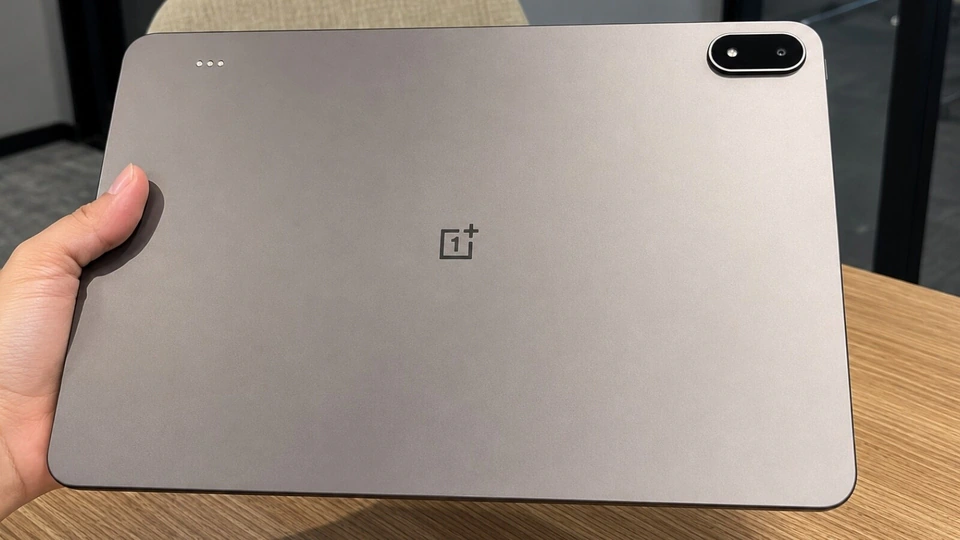
2. OnePlus Pad 4: A Large-Screen Tablet for Gaming and Multitasking
The OnePlus Pad 4 is the performance-focused option in this selection. Its 13.2-inch 3.4K display supports a refresh rate of up to 144Hz, giving users a large viewing area for movies, supported high-frame-rate games, split-screen applications and other visually demanding activities.
The featured configuration combines 8GB of RAM with 256GB of storage and a Snapdragon 8 Elite Gen 5 platform. This hardware is intended for demanding applications and multitasking, although actual performance will depend on the software, workload and optimisation of individual apps.
The tablet also features an eight-speaker setup, making it attractive to people who frequently watch films, play games or listen to music without headphones. Its large screen can also provide more space for working across compatible applications.
However, the premium specification comes with a higher purchase price. At the listed Rs. 62,999, the OnePlus Pad 4 is the most expensive option among these six tablets. Buyers should consider whether they will actually use its additional performance and display capabilities before paying more than they would for a tablet designed for everyday tasks.
Key specifications and features
- Display: 13.2-inch 3.4K display.
- Refresh rate: Up to 144Hz.
- Processor: Snapdragon 8 Elite Gen 5 platform.
- Memory: 8GB RAM in the featured configuration.
- Storage: 256GB.
- Audio: Eight-speaker setup.
- Connectivity: Wi-Fi-only configuration.
Reasons to buy
- The large, high-resolution display provides room for gaming, video playback and multitasking.
- The high-refresh-rate panel supports smoother scrolling and compatible games.
- The performance-focused processor is suited to demanding applications and heavier workloads.
- The eight-speaker system adds to its appeal for entertainment.
- The 256GB storage configuration provides more room for applications, games and downloaded media than a smaller-capacity model.
Reasons to avoid
- The listed price is the highest in this selection.
- The Wi-Fi-only model cannot access mobile networks directly.
- The keyboard and Stylo accessories are sold separately, increasing the cost of a productivity setup.
- The large display may be less convenient for users who prioritise compactness and one-handed use.
Why consider the OnePlus Pad 4?
The OnePlus Pad 4 is worth considering if you want a tablet with a large, high-refresh-rate display and performance-oriented hardware. It is particularly relevant to users who regularly play demanding games, multitask across applications or consume a substantial amount of video content.
For basic browsing, online classes and reading, however, its premium capabilities may be unnecessary. Buyers should compare the cost of the tablet and accessories against their actual requirements rather than choosing the most powerful device simply because it has the highest specifications.
3. Samsung Galaxy Tab S10 FE+: A Large Display With S Pen Support
The Samsung Galaxy Tab S10 FE+ combines a 13.1-inch display with an Exynos 1580 processor and S Pen support. Its large screen provides room for reading documents, taking handwritten notes, annotating PDFs and working across multiple applications.
The featured listing has 8GB of RAM, 128GB of internal storage and Wi-Fi connectivity. One of its main advantages is the included S Pen, which allows users to start writing, sketching or marking up documents without having to purchase a separate compatible stylus.
This can make the tablet particularly appealing to students and professionals who regularly work with handwritten material. A larger display can also be helpful when comparing documents, reading lengthy reports or viewing presentations.
The tablet uses a TFT LCD panel rather than an OLED display, so buyers should not expect the same deep blacks associated with OLED technology. The 128GB storage capacity may also be restrictive for people who keep large collections of games, videos or offline files on their devices.
Key specifications and features
- Display: 13.1-inch display.
- Processor: Exynos 1580.
- Memory: 8GB RAM.
- Storage: 128GB.
- Display technology: TFT LCD.
- Stylus: S Pen support, with the S Pen included in the featured configuration.
- Connectivity: Wi-Fi-only configuration.
Reasons to buy
- The large display provides additional space for documents, split-screen applications and handwritten notes.
- The included S Pen is useful for students, professionals and people who prefer writing by hand.
- Expandable storage offers additional flexibility for compatible files and downloaded media.
- The tablet is well suited to reading, annotating documents and drawing with compatible applications.
Reasons to avoid
- The TFT LCD panel does not provide the same contrast characteristics as an OLED screen.
- The Wi-Fi-only version cannot connect directly to mobile data networks.
- The 128GB internal storage may be limiting for users with extensive game and media libraries.
- The large screen may be less convenient for frequent travel than a smaller tablet.
Why consider the Samsung Galaxy Tab S10 FE+?
The Galaxy Tab S10 FE+ is a practical option for people who want a large screen and stylus-based productivity. The included S Pen is especially useful for students taking notes, professionals reviewing documents and users who prefer handwritten input to typing.
Before buying, check the exact storage expansion options and the current listing details. Buyers who primarily want a portable device for reading or streaming may find a smaller tablet easier to carry, while those who need mobile internet should compare the available connectivity variants.
4. Lenovo Idea Tab Plus: A Productivity Bundle With 5G
The Lenovo Idea Tab Plus takes a productivity-oriented approach by combining a 12.1-inch 2.5K display with a 90Hz refresh rate, 12GB of RAM and 256GB of storage in the featured 5G configuration.
Unlike options that require separate purchases for basic productivity accessories, the specified Lenovo configuration includes a Tab Pen and folio keyboard. That combination can be useful for typing assignments, taking handwritten notes, editing documents and handling routine work away from a desk.
Its 5G connectivity is another important distinction. A compatible cellular tablet can access mobile data without relying entirely on a Wi-Fi network or phone hotspot, making it useful for commuters, students and professionals who regularly work outside the home.
The device uses a MediaTek Dimensity 6400 processor, which is positioned for everyday use rather than flagship-level gaming and intensive creative workloads. Its IPS LCD display also differs from the OLED panels found in some premium devices.
Buyers should consider the Lenovo’s overall package rather than judging it by the processor alone. For people who need a keyboard, stylus and mobile connectivity, the included accessories and 5G support may be more valuable than a faster processor they would rarely use.
Key specifications and features
- Display: 12.1-inch 2.5K display.
- Refresh rate: 90Hz.
- Processor: MediaTek Dimensity 6400.
- Memory: 12GB RAM in the featured configuration.
- Storage: 256GB.
- Connectivity: 5G model.
- Accessories: Tab Pen and folio keyboard included in the specified bundle.
Reasons to buy
- The 12GB RAM and 256GB storage configuration provides room for multitasking, applications and documents.
- The included pen and keyboard make the package suitable for note-taking and routine productivity.
- 5G connectivity allows compatible mobile data use away from Wi-Fi.
- The 12.1-inch display provides a useful balance between working space and portability.
Reasons to avoid
- The Dimensity 6400 is better suited to everyday applications than demanding games and intensive creative workloads.
- The IPS LCD display does not offer OLED contrast.
- The USB-C port uses USB 2.0 transfer speeds, which can limit wired file-transfer performance.
- Buyers should verify the exact accessory bundle because configurations and listings can differ.
Why consider the Lenovo Idea Tab Plus?
The Lenovo Idea Tab Plus is worth considering for students and mobile workers who want a tablet that can handle documents, online classes, handwritten notes and typing without depending entirely on Wi-Fi.
Its combination of 5G connectivity and bundled accessories gives it a different value proposition from tablets that focus primarily on display quality or raw processing power. However, people who regularly edit demanding creative projects or play graphics-intensive games should compare its performance with more powerful alternatives.
5. Motorola Pad 70 Pro: A 144Hz Tablet for Entertainment and Work
The Motorola Pad 70 Pro combines a 13-inch 3.5K display with a Snapdragon 8s Gen 4 processor and a refresh rate of up to 144Hz. These features make it an option for users who want a large screen for entertainment, gaming and multitasking.
The high-resolution display provides a generous viewing area for movies, documents and compatible applications. Its high refresh rate can make scrolling and supported games appear smoother, while the processor is intended to handle demanding apps more comfortably than entry-level hardware.
The featured configuration also includes an active stylus and a magnetic keyboard case. These accessories make the tablet more flexible, allowing users to switch between handwritten notes, document editing and entertainment without immediately purchasing additional equipment.
There are some compromises to consider. The specified model is Wi-Fi-only, so users who need internet access while travelling will have to rely on a wireless network or hotspot. Its 128GB storage capacity is also lower than the 256GB configurations offered by some alternatives in this list.
At around 598 grams, the 13-inch tablet is also less compact than smaller models. Buyers should consider whether the larger display is worth the additional size and weight for their everyday routine.
Key specifications and features
- Display: 13-inch 3.5K display.
- Refresh rate: 144Hz.
- Processor: Snapdragon 8s Gen 4.
- Storage: 128GB in the featured configuration.
- Connectivity: Wi-Fi-only model.
- Accessories: Active stylus and magnetic keyboard case included in the specified bundle.
- Weight: Approximately 598 grams.
Reasons to buy
- The 144Hz display supports smooth scrolling and compatible high-frame-rate games.
- The processor is suited to demanding applications and entertainment.
- The included stylus and keyboard case offer flexibility for writing, typing and note-taking.
- The large display is useful for split-screen work, video playback and reading documents.
Reasons to avoid
- The Wi-Fi-only version cannot connect directly to a mobile data network.
- The 128GB storage capacity may be restrictive for users who download large games and videos.
- The 13-inch screen and approximately 598-gram weight make it less compact than smaller tablets.
- Buyers should confirm the included accessories and warranty details on the exact Flipkart listing.
Why consider the Motorola Pad 70 Pro?
The Motorola Pad 70 Pro is worth considering if you want a large-screen tablet that combines entertainment-focused features with accessories for productivity. Its high refresh rate, capable processor and keyboard-and-stylus bundle make it suitable for users who alternate between gaming, streaming, note-taking and occasional typing.
Before buying, compare the storage capacity and connectivity with your needs. A smaller tablet may be more convenient for travel, while a model with cellular connectivity may be a better fit for people who frequently work outside Wi-Fi coverage.
6. Redmi Pad 2: An Affordable Option for Everyday Use
The Redmi Pad 2 is the most affordable tablet in this selection based on the supplied prices, with a listed price of Rs. 21,999. It is designed for everyday activities such as online classes, browsing, reading, streaming and casual gaming.
The featured model has an 11-inch 2.5K display with a refresh rate of up to 90Hz. This combination offers a detailed viewing area for reading digital textbooks, watching videos and browsing websites without moving into the premium price range of the larger tablets.
Its MediaTek Helio G100-Ultra processor is intended for everyday workloads rather than intensive gaming or demanding creative applications. The listed configuration includes 6GB of RAM and 128GB of storage, alongside Wi-Fi and 4G connectivity.
The cellular connection is an important advantage for people who need internet access outside the home. With a compatible SIM and supported network, users can connect directly to mobile data instead of relying on a phone hotspot.
The tablet also supports expandable storage, which can be useful for downloaded videos, documents and other files. However, buyers should remember that the 9,000mAh battery and 18W charging support mean a full recharge can take time, depending on the charging conditions.
Key specifications and features
- Display: 11-inch 2.5K display.
- Refresh rate: Up to 90Hz.
- Processor: MediaTek Helio G100-Ultra.
- Memory: 6GB RAM.
- Storage: 128GB, with expandable storage support.
- Connectivity: Wi-Fi and 4G in the featured configuration.
- Battery: 9,000mAh.
- Charging: 18W charging support.
Reasons to buy
- The 2.5K display offers a detailed viewing experience for online classes, reading and entertainment.
- 4G connectivity allows mobile internet access with a compatible SIM and supported network.
- Expandable storage provides flexibility for downloaded media and documents.
- The listed price makes it the most affordable option among these six tablets.
- The 11-inch screen provides a practical balance between viewing space and portability.
Reasons to avoid
- The Helio G100-Ultra is better suited to everyday applications than demanding games and intensive creative workloads.
- The IPS LCD panel does not offer the deep blacks associated with OLED technology.
- The 18W charging support may make recharging the 9,000mAh battery relatively slow.
- The 6GB RAM configuration may be less suitable for particularly demanding multitasking than higher-memory alternatives.
Why consider the Redmi Pad 2?
The Redmi Pad 2 is worth considering if you want a tablet for online learning, browsing, video streaming and everyday entertainment without spending as much as you would on a premium model.
Its combination of a high-resolution display, expandable storage and 4G connectivity gives it a practical advantage for users who need a straightforward tablet for home and travel. It is not designed to compete with flagship tablets in demanding workloads, but buyers who mainly use standard apps may not need that additional performance.
How to Choose the Right Tablet Deal on Flipkart
Comparing tablet deals becomes easier when you focus on how the device will be used rather than looking only at the discount percentage. A tablet with a smaller advertised discount may offer better value if it includes the storage, connectivity and accessories you need.
1. Choose the right display size
Screen size affects both usability and portability. Tablets around 10 to 11 inches are generally easier to carry and can be comfortable for reading, browsing and streaming. Models with displays of 12 inches or more provide additional room for documents, split-screen applications, drawing and keyboard-based work.
A larger display is not automatically better for everyone. If you regularly travel with your tablet, use it while commuting or prefer reading in one hand, a more compact device may be more practical.
2. Compare processors and RAM
Basic browsing, video streaming and online classes do not necessarily require flagship hardware. For those activities, a more affordable processor may provide sufficient performance.
Demanding games, creative applications and heavier multitasking can benefit from more powerful processors and adequate RAM. Before buying, compare the processor and memory configuration of the exact model rather than relying on the brand name alone.
RAM and storage serve different purposes. RAM helps the device manage active applications, while internal storage holds apps, downloaded files, photographs and offline videos. A tablet with more RAM does not automatically provide more storage.
3. Decide whether you need mobile connectivity
Wi-Fi-only tablets are suitable for people who mostly use their devices at home, at school, in the office or in locations with reliable wireless internet. They can also access the internet through a compatible phone hotspot.
Cellular models provide another option by connecting to supported mobile networks. The Lenovo Idea Tab Plus and Redmi Pad 2 configurations described here offer mobile connectivity, while the featured Apple, OnePlus, Samsung and Motorola listings are Wi-Fi-only.
Before choosing a cellular tablet, confirm the supported network technology, SIM requirements and compatibility with your preferred mobile operator. Do not assume every variant of the same tablet supports 4G or 5G.
4. Check whether a keyboard and stylus are included
Accessories can make a significant difference to the total cost of a tablet. A keyboard is useful for long documents, assignments, emails and spreadsheets, while a stylus can improve handwriting, sketching and document annotation.
The specified Lenovo Idea Tab Plus and Motorola Pad 70 Pro bundles include a keyboard and pen or stylus. The Samsung Galaxy Tab S10 FE+ configuration includes an S Pen, while the Apple iPad and OnePlus Pad 4 may require separate accessory purchases for a similar setup.
Always check the exact listing because accessory availability can differ between configurations and sellers. A bundle that appears more expensive initially may provide better overall value if it includes the equipment you would otherwise purchase separately.
5. Look beyond the advertised discount
A discount percentage is useful only when considered alongside the final price and the product’s actual features. Compare the current selling price with your budget, the storage capacity, the connectivity options and the accessories included.
Also check whether bank discounts, exchange benefits or other promotional offers apply to your payment method and device. Such offers may be conditional and can change over time.
The final amount payable is more important than the headline discount. Before placing an order, review the checkout price, delivery terms, seller information, return conditions and warranty details.
Which Tablet Is Best for Your Needs?
Each of these six tablets targets a different type of buyer. The most suitable choice depends on the tasks you perform regularly, your budget and whether you need a cellular connection or productivity accessories.
- For Apple users: The Apple iPad (A16) is worth considering for its processor, compatible Apple Pencil support and access to Apple’s tablet app ecosystem.
- For demanding gaming and multitasking: The OnePlus Pad 4 offers a large 144Hz display, performance-focused hardware and an eight-speaker setup.
- For handwritten notes and documents: The Samsung Galaxy Tab S10 FE+ combines a large screen with S Pen support.
- For mobile productivity: The Lenovo Idea Tab Plus offers a keyboard-and-pen bundle and 5G connectivity in the specified configuration.
- For entertainment with productivity accessories: The Motorola Pad 70 Pro combines a 144Hz display with an active stylus and magnetic keyboard case.
- For everyday use on a tighter budget: The Redmi Pad 2 offers a high-resolution display, expandable storage and 4G connectivity at the lowest listed price in this group.
These descriptions are use-case comparisons, not a universal ranking. A student who mainly reads PDFs may value portability and battery life more than processing power, while a gamer may prioritise display refresh rate and processor performance. Someone who works away from Wi-Fi may find cellular connectivity more useful than a higher-resolution screen.
Can a Tablet Really Replace Your Laptop?
A tablet can replace a laptop for selected tasks, but the experience depends on the software, accessories and type of work involved.
For online classes, video calls, reading, email, browsing and note-taking, a capable tablet can cover many everyday needs. Adding a compatible keyboard can make writing documents and responding to messages more comfortable, while a stylus can be useful for handwritten notes and annotations.
However, tablets may not provide the same flexibility as a laptop for every professional workflow. Some desktop applications, advanced development tools, specialised software and complex file-management tasks may work better on a traditional computer.
Keyboard-based productivity also depends on the operating system and application support. Before replacing a laptop, check whether the programs you rely on are available and whether they support the features you need.
For users who mainly consume content, attend online classes and complete standard office tasks, a tablet may reduce the need to carry a laptop every day. For people who depend on desktop-only software or extensive multitasking, it may work better as a companion device than as a complete replacement.
Frequently Asked Questions
1. Which is the cheapest tablet among these six Flipkart deals?
The Redmi Pad 2 is the most affordable tablet in this selection based on the supplied prices, with a listed price of Rs. 21,999. Its 11-inch 2.5K display, expandable storage and 4G connectivity make it an option for online classes, browsing and everyday entertainment. Check Flipkart for the latest price and available offers.
2. Which tablet is suitable for gaming?
The OnePlus Pad 4 and Motorola Pad 70 Pro are worth considering for gaming because both feature large displays with refresh rates of up to 144Hz and performance-oriented processors. Actual gaming performance depends on the game, software optimisation and graphics settings, so buyers should compare performance reviews for the specific model.
3. Which tablet is suitable for students?
The best option depends on the student’s needs. The Samsung Galaxy Tab S10 FE+ offers S Pen support for handwritten notes, while the Lenovo Idea Tab Plus includes a keyboard and pen in the specified bundle. The Redmi Pad 2 is a more affordable option for online classes, reading and standard educational applications.
4. Which tablets in this selection support mobile internet?
The featured Lenovo Idea Tab Plus configuration supports 5G, while the listed Redmi Pad 2 configuration supports 4G. The Apple iPad, OnePlus Pad 4, Samsung Galaxy Tab S10 FE+ and Motorola Pad 70 Pro configurations described here are Wi-Fi-only. Always confirm network compatibility and the exact model variant before purchasing.
5. Do these tablets include a keyboard or stylus?
According to the supplied configurations, the Lenovo Idea Tab Plus includes a Tab Pen and folio keyboard, while the Motorola Pad 70 Pro includes an active stylus and magnetic keyboard case. The Samsung Galaxy Tab S10 FE+ configuration includes an S Pen. Compatible Apple Pencil models and the OnePlus Pad 4’s keyboard and Stylo are separate purchases in the described listings.
6. Is the Apple iPad (A16) suitable for work?
The Apple iPad (A16) can handle many everyday productivity tasks, including email, document editing, online meetings, note-taking and supported creative applications. Its suitability depends on the software you use and whether you need a keyboard or stylus. Check app compatibility before using it as a replacement for a laptop.
7. What should buyers check before purchasing a tablet on Flipkart?
Check the exact model, RAM, storage, display specifications, network connectivity, included accessories and warranty conditions. Compare the final checkout price rather than relying only on the advertised discount, and verify whether bank offers or exchange benefits apply to your purchase.
8. Can a tablet completely replace a laptop?
A tablet can replace a laptop for many everyday activities, including browsing, streaming, online learning, email and document editing. However, some desktop applications and specialised professional workflows may require a traditional computer. Check the compatibility of your essential software before deciding to replace your laptop.
Final Verdict: Choose Features That Match Your Budget
These six Flipkart tablet deals offer different ways to move everyday computing away from a traditional laptop. The Redmi Pad 2 focuses on affordability and mobile connectivity, while the Apple iPad (A16) offers a versatile option for users who prefer Apple’s ecosystem. Samsung’s Galaxy Tab S10 FE+ is relevant to people who take handwritten notes, and Lenovo’s Idea Tab Plus combines mobile connectivity with productivity accessories.
For buyers who prioritise a large display and performance, the OnePlus Pad 4 and Motorola Pad 70 Pro offer high-refresh-rate screens and hardware aimed at more demanding applications. Their higher prices make it especially important to consider whether those capabilities justify the additional spending.
Ultimately, the best tablet deal is not necessarily the one with the biggest discount or the highest specifications. It is the device that meets your requirements for performance, screen size, connectivity, storage and accessories at a price you can comfortably afford. Compare the current Flipkart listing and final checkout amount before making your decision.
Shopping note: Prices, advertised discounts, stock and payment offers may change. Verify all specifications, bundle contents, seller information and warranty conditions on the relevant Flipkart product page before purchasing.
For breaking news and live news updates, like us on Facebook or follow us on Twitter and Instagram. Read more on Latest Technology on thefoxdaily.com.






COMMENTS 0