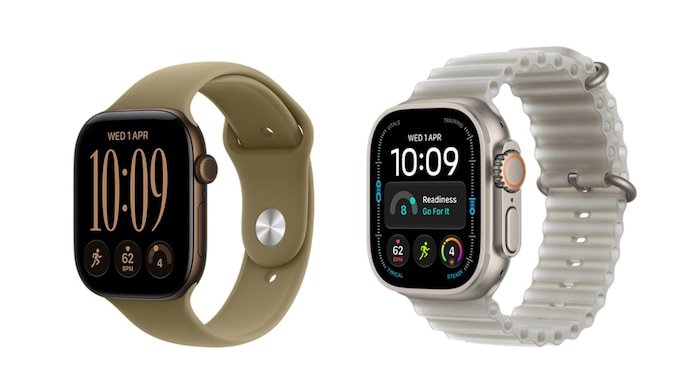
Apple has released a software update for its newest Smartwatches after owners of the Apple Watch Series 12 and Apple Watch Ultra 4 reported unexpected restarts during everyday use. The company has now rolled out watchOS 27.0.1, a targeted update designed to address the reboot problem affecting the two newly launched models.
The issue surfaced shortly after Apple introduced the next-generation watches on September 18. Some owners reported that their devices could suddenly restart while performing activities that should normally be routine, including editing watch faces, making calls, using Siri, opening Apple Maps or the App Store, and even recording workouts.
Reports began appearing on Reddit and Apple Community Support, with affected users describing restarts that could interrupt whatever they were doing. A reboot during a workout is particularly inconvenient because it can disrupt activity tracking at the exact moment the watch is being used to record exercise data.
Apple has responded with watchOS 27.0.1, released just over a week after the broader watchOS 27.0 update. Unlike a feature-heavy software release, this update is focused specifically on correcting the unexpected restart behavior.
What caused the Apple Watch random restart bug?
The technical explanation behind the problem is unusually specific. According to a report citing an Apple forum post, the restart was connected to a timeout involving the watch’s Neural Engine.
The Neural Engine is designed to handle machine-learning-related workloads on Apple’s devices. In the situation described in the report, a command sent to the Neural Engine was expected to finish within 2,000 milliseconds.
Instead, the operation reportedly took 2,020 milliseconds.
That difference is only 20 milliseconds, but it was apparently enough to cause the system to treat the operation as a failure and initiate a full restart. In other words, a tiny timing problem could have consequences that were much more noticeable to the person wearing the watch.
The incident highlights how modern wearable devices depend on a large number of tightly coordinated software and hardware processes. Something as small as a timeout threshold can potentially affect the stability of the entire operating system when a system-level process does not behave as expected.
Apple has not publicly explained what caused the Neural Engine operation to exceed the expected limit in the first place. The company has instead confirmed the practical solution through watchOS 27.0.1, which addresses the issue.
Why the bug was particularly frustrating for new owners
The timing of the problem made the reports especially noticeable. The Apple Watch Series 12 and Ultra 4 had only just reached customers when owners began experiencing the unexpected restarts.
For a new device, reliability is one of the first things users expect. A watch that suddenly reboots while someone is changing a watch face is inconvenient. A restart during a phone call, while interacting with Siri or while using navigation can be considerably more disruptive.
The problem was even more problematic during workouts. Apple Watch users often rely on their devices to record exercise sessions, monitor activity and track progress. An unexpected restart in the middle of a workout can interrupt that experience and potentially leave users wondering whether their activity data was preserved correctly.
Because the reported restarts occurred across several different activities, the problem did not appear to be limited to a single app or feature from the user’s perspective. That helped turn what might otherwise have been isolated software complaints into a broader concern among early buyers.
watchOS 27.0.1 is a targeted fix
The new release is not positioned as a major feature update. Its primary purpose is to resolve the restart problem affecting Apple’s newest watch models.
Apple’s support information does not list CVE entries associated with the release, indicating that the update is not being presented as a security-focused patch. Instead, its purpose is to improve system stability by addressing the underlying software issue responsible for the unexpected restarts.
That distinction matters for users deciding whether the update is relevant to them. If an Apple Watch Series 12 or Ultra 4 has been restarting unexpectedly, watchOS 27.0.1 directly addresses the problem described in the reports.
For owners WHO have not experienced a restart, installing the update still brings the software to the latest version available for their model. As with any operating-system update, keeping the device current can also ensure that known software problems are addressed as Apple identifies them.
Which Apple Watch models can install watchOS 27.0.1?
Apple has limited watchOS 27.0.1 to the two 2026 models affected by the restart problem: the Apple Watch Series 12 and Apple Watch Ultra 4.
That means owners of older Apple Watch models should not expect to see watchOS 27.0.1 listed as an available update for their devices. The release is specifically targeted at the hardware generations associated with the reported issue.
This model-specific approach also reinforces the nature of the update. Rather than being a general maintenance release for the entire Apple Watch lineup, watchOS 27.0.1 is designed to address a problem associated with the newest watches.
How to update an Apple Watch directly
Installing watchOS 27.0.1 directly from the Apple Watch is straightforward. Before beginning, Apple requires the watch to have at least 50 percent battery remaining and to be connected to Wi-Fi.
On the Apple Watch, open Settings, select General, and then tap Software Update. If watchOS 27.0.1 is available for the device, the option to install the update will appear.
From there, users can tap Install and follow the instructions displayed on the screen. The watch will handle the installation process and restart as required.
How to install watchOS 27.0.1 from an iPhone
Apple Watch owners can also install the update through the Watch app on their paired iPhone.
Open the Apple Watch app on the iPhone and go to General. Select Software Update and check whether watchOS 27.0.1 is available.
If the update appears, users can download and install it by following the on-screen instructions. The process provides an alternative for people who prefer managing Apple Watch software through their iPhone rather than directly on the watch.
As with the direct update method, ensuring the watch has sufficient battery and access to Wi-Fi before starting can help prevent interruptions during installation.
What Apple Watch users should do if their watch keeps restarting
For Series 12 and Ultra 4 owners who have experienced repeated restarts, installing watchOS 27.0.1 is the most direct step provided by Apple for the reported software problem.
The update is particularly relevant if the restarts have occurred during activities identified in user reports, such as editing watch faces, making calls, interacting with Siri, opening Apple Maps or the App Store, or recording workouts.
If the watch continues to restart after the update, the situation may require further troubleshooting rather than assuming that every reboot has the same cause. Users can monitor whether the behavior continues and seek support if the problem persists.
A tiny timing error with a big user impact
The reported Neural Engine timeout is a useful reminder of how complicated smartwatch software has become. The difference between a successful operation and a system restart was reportedly only 20 milliseconds beyond the expected two-second limit.
For users, however, the technical difference was irrelevant in the moment. What they experienced was a watch that suddenly stopped what it was doing and rebooted.
That disconnect between the complexity of the underlying software and the simplicity of the visible problem is common in modern electronics. A failure deep inside the operating system can present itself to the user as something that seems completely random.
In this case, the range of situations in which users reported the problem made the behavior appear unpredictable. Apple’s software update now aims to remove the condition that triggered those restarts.
Why this update matters for the Apple Watch Series 12 and Ultra 4
The Apple Watch Series 12 and Ultra 4 represent Apple’s newest smartwatch generation, so early software stability is especially important for owners who have just moved to the latest hardware.
The reported reboot issue did not prevent the watches from performing their normal functions in every situation, but unexpected restarts can undermine confidence in a device that users depend on throughout the day. That is particularly true when the watch is being used for communications, navigation or Fitness tracking.
watchOS 27.0.1 therefore serves a relatively narrow but important purpose. It is not about adding a new collection of headline features. It is about making sure the newest Apple Watches behave reliably during the activities users already expect them to handle.
For Series 12 and Ultra 4 owners, checking for the update is a simple way to address the specific restart bug that emerged after launch.
Apple moves quickly to address the reboot problem
The sequence of events is notable. Apple launched the Series 12 and Ultra 4 on September 18, reports of unexpected restarts began appearing shortly afterward, and watchOS 27.0.1 arrived just over a week after watchOS 27.0.
The reported problem was narrow enough for Apple to address it through a point-release update rather than waiting for a larger operating-system release.
For affected owners, the most important takeaway is equally straightforward: watchOS 27.0.1 is specifically intended to fix the random restart issue on the Apple Watch Series 12 and Apple Watch Ultra 4.
The underlying problem reportedly involved a Neural Engine command exceeding its expected timeout by just 20 milliseconds. Apple has not detailed why that timeout occurred, but the company has released software intended to prevent the resulting restart.
With the update available, owners of the affected models can check their watch or paired iPhone and install the latest software. For anyone whose new Apple Watch has already rebooted unexpectedly, especially during a workout, call or other active task, updating provides the clearest first step toward resolving the problem.
For breaking news and live news updates, like us on Facebook or follow us on Twitter and Instagram. Read more on Latest Technology on thefoxdaily.com.






COMMENTS 0