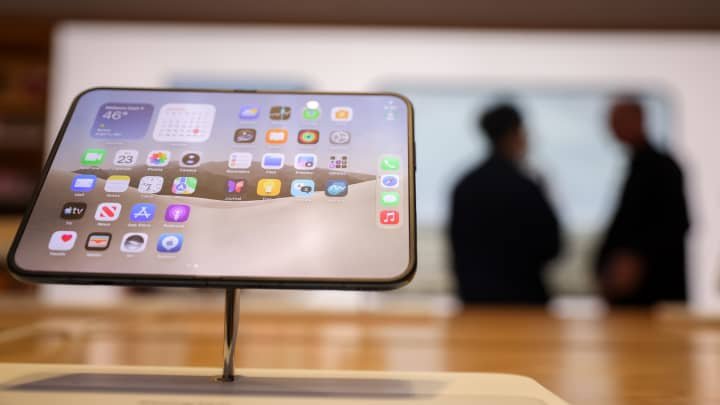
For someone who has used an iPhone for well over 15 years, familiarity is a major part of the experience. The design, software and everyday interactions have become second nature. A foldable iPhone, however, changes many of those habits. That is precisely what makes the iPhone Duo interesting, particularly for users curious about how Apple would approach the foldable smartphone category.
After spending a week with the iPhone Duo, the biggest question was whether the excitement of experiencing something new was enough to justify moving away from the familiarity of a conventional iPhone.
The Duo introduces several unfamiliar ways to interact with an iPhone. Its folding design, unusual front-screen layout and larger internal display create possibilities that traditional smartphones cannot offer. At the same time, the device comes with compromises that become noticeable during everyday use.
iPhone Duo Design: A Different Kind of Foldable Experience
The first thing that stands out when holding the iPhone Duo is how different it feels. This is not the reviewer’s first foldable smartphone, nor the first passport-sized foldable device, having recently tested the Samsung Galaxy Fold 8. Yet Apple’s approach gives the Duo a distinct character.
The phone weighs approximately the same as the iPhone 18 Pro Max, but it is 25% heavier than the Galaxy Fold 8. That difference becomes noticeable when holding the device for extended periods, particularly because a foldable requires frequent opening and closing.
The hinge and overall construction also create a different impression. Compared with other first-generation foldables the reviewer has used, the Duo feels more robust and has a more durable-feeling hinge. The folding display does not appear particularly fragile during normal use, although careful handling remains essential.
Foldable Smartphones still require additional care compared with conventional devices. A damaged folding display or hinge can be expensive to repair, potentially costing as much as purchasing a new device. The Duo’s sturdy feel does not eliminate that concern.
Apple’s Crease-Free Display Is the Biggest Design Highlight
One of the most noticeable features becomes apparent immediately after removing the packaging. The folding display does not show a visible crease, addressing one of the most familiar complaints associated with foldable smartphones.
However, the matte screen protector is clearly visible, particularly when viewed from certain angles. While the protector remains noticeable, the absence of a prominent crease makes the Duo stand out among foldable devices.
Apple appears to have focused heavily on the visual perception of the folding screen. Instead of asking users to accept a visible crease as part of the experience, the company has approached the issue differently. This became one of the first things people wanted to inspect when they saw the phone, and the reviewer found that the reaction was generally positive.
The display’s appearance gives the Duo an immediate advantage in terms of first impressions. It also demonstrates how much the visual experience matters when introducing a new category of iPhone.
Front Display and Side App Dock Take Time to Get Used To
The front display introduces another unfamiliar experience for long-time iPhone users. Although the Duo has a passport-sized design similar to the Galaxy Fold 8, its screen layout is noticeably different.
Unlike the conventional rectangular appearance of most smartphone displays, the Duo’s front screen has two curved corners. These make the device comfortable to hold, but the combination of curved corners on one side and sharp corners on the other can feel unusual when browsing or navigating apps.
Apple has also moved the familiar app dock from the bottom of the screen to the side. Positioned between the two curved corners, the dock makes frequently used applications easier to reach with the thumb when operating the closed phone with one hand.
However, this arrangement comes with a drawback: it reduces the usable space available for content on the front display.
While browsing the Indian Express website, the reviewer felt that the screen offered considerably less viewing space than a conventional smartphone. This makes the front display less comfortable for certain activities and encourages users to open the phone more frequently.
iPhone Duo’s Inner Display Feels Like an iPad Mini
Opening the Duo reveals what is arguably its most impressive feature: the large internal display. The reviewer described the experience as more fluid and tablet-like than any other foldable screen used previously.
The display creates an experience similar to using an iPad Mini, making it particularly suitable for watching videos, reading websites and browsing social media.
During a long-haul flight back from San Francisco, the reviewer spent more than eight hours watching shows on the device. The phone could be held comfortably, propped against a bottle on the food tray or rested on the lap.
Another advantage is the flexibility of the display’s orientation. Users can switch between horizontal and vertical viewing depending on what they are doing. Landscape mode works well for watching content, while portrait orientation is useful for reading websites and browsing social media.
This flexibility makes the Duo feel less like a conventional smartphone and more like a compact tablet that can be carried around easily.
Flexible Orientation Can Also Create Navigation Problems
The freedom to use the Duo in different orientations introduces an unexpected challenge. Because the device feels natural in both horizontal and vertical positions, users can sometimes lose track of how they are holding it.
This becomes particularly noticeable when trying to locate physical controls such as the volume and power buttons. The reviewer initially found themselves searching for the buttons depending on the phone’s orientation.
A practical solution emerged after a couple of days: using the camera bump as a reference point to understand how the device was positioned.
Application compatibility presents another challenge. Not every app has been optimised for the Duo’s unusual screen dimensions and flexible orientation. Depending on the application, the user interface can become confusing or leave significant portions of the display unused.
Popular applications such as LinkedIn continue to operate much like they would on a conventional smartphone. This can make the large internal screen feel underutilised.
Even when an application is expanded to fill more of the display, the sidebar can remain visible and prevent the app from using the entire screen. The sidebar disappears while watching videos, which provides a more immersive experience.
The reviewer expects developers to need time to update their applications for the new screen format. Until more widely used apps support the Duo’s display properly, users may not be able to take full advantage of the additional screen space.
Face ID Is Missing, and Touch ID Requires Adjustment
One of the biggest adjustments for a long-time iPhone user is the absence of Face ID. After years of relying on facial recognition to unlock an iPhone, authenticate payments and access applications, switching to a different authentication method can feel inconvenient.
The Duo uses Touch ID integrated into the power button. This means users need to locate the button to unlock the device or authenticate themselves.
The reviewer initially configured the phone using only one fingerprint. This created difficulties depending on which hand was being used to hold the device and the orientation in which it was positioned.
Although Touch ID provides an alternative authentication method, users accustomed to Face ID may need time to adjust to the different unlocking process.
iPhone Duo Camera Introduces New Ways to Take Photos
The foldable design also changes how users can interact with the camera. One particularly useful feature is the ability to take selfies using the main camera while viewing the composition on the front display.
This gives users access to the primary camera system for self-portraits while still being able to see how the image will look before capturing it.
The Duo also includes a feature called Kid Cue, which is designed to entertain toddlers and help capture more natural photographs of them.
However, the camera itself does not match the capabilities of Apple’s Pro Max devices. The reviewer described it as a good iPhone camera, but not the best camera experience available in the iPhone lineup.
The additional screens provide useful options for composition and creative camera angles, but buyers should not assume that paying more for the foldable automatically means getting Apple’s most advanced camera system.
The camera is one of the areas where users make compromises in exchange for the convenience and flexibility of the foldable design.
Third-Party Apps Are Exploring the Potential of the Foldable Screen
While several popular applications have yet to adapt fully to the Duo, some developers have already started experimenting with its unusual display.
The reviewer highlighted applications such as Battlefleet Duo and MD Vinyl, which make creative use of the phone’s half-folded position at a 90-degree angle.
Other applications, including 24me, Timepage and Delta, also use the additional screen space in ways that demonstrate the possibilities of the new form factor.
Some of these experiences are primarily designed for entertainment, while others offer practical features. Together, they show how developers can create applications that take advantage of the Duo’s folding mechanism rather than simply enlarging existing smartphone interfaces.
However, broader adoption by frequently used applications remains important. The reviewer believes that more major apps need to embrace the experience, pointing to Netflix as an example of an application that makes good use of the available display.
Apple’s Software Transitions and Animations Stand Out
Apple’s software implementation is another area that impressed the reviewer. The transitions and animations between the two displays feel particularly polished.
Moving content from one screen to the other is handled smoothly, with the reviewer noting that other foldable devices have not managed the handover in quite the same way.
The Shortcuts app also provides additional customisation options. Users can create actions that automatically trigger when the phone is opened or closed.
These features help make the folding mechanism more than just a physical design change. They allow the software to respond to how the device is being used, creating opportunities for more personalised interactions.
iPhone Duo Battery Life and MagSafe Charging
Battery life is often a concern with foldable smartphones because they have to power larger displays while maintaining a relatively compact design.
The iPhone Duo performs surprisingly well in this area. According to the reviewer’s experience, the device lasted a full day on a single charge, making it suitable for regular daily use.
MagSafe charging was another feature that received positive feedback. The magnetic charging system holds the phone firmly in place, including when it is attached to charging stands.
The reviewer particularly appreciated this implementation, noting that the experience was something they had not previously encountered on foldable smartphones.
While battery performance may vary depending on display usage and individual habits, the ability to get through a full day was a positive aspect of the Duo’s overall experience.
iPhone Duo Review: Should You Buy Apple’s Foldable iPhone?
The iPhone Duo is arguably one of the most desirable smartphones at the moment, particularly for Apple users who have been waiting for the company to enter the foldable category.
Its crease-free display, tablet-like internal screen, polished software transitions and flexible camera experience make it an interesting addition to the iPhone lineup.
However, the device also carries several first-generation limitations. The unusual front-screen layout, missing Face ID, application compatibility issues and camera compromises are noticeable during everyday use.
Some problems may be addressed through software updates over the coming weeks, while others could require hardware or design changes in a future generation.
The reviewer recommends the iPhone Duo primarily for dedicated Apple enthusiasts who enjoy purchasing the company’s latest products, people who want a large-screen experience while travelling and users who enjoy experimenting with unfamiliar Technology.
For regular smartphone users who prioritise familiarity and a predictable everyday experience, waiting may be the better approach. The first-generation Duo offers an exciting glimpse of how an iPhone can evolve, but buyers should be prepared to accept its compromises.
Final Verdict
The iPhone Duo makes the foldable iPhone experience feel fresh and different. Its internal display is particularly impressive, offering the flexibility of a compact tablet without sacrificing the portability of a smartphone.
Apple has also delivered a polished folding experience through its hinge design, screen transitions and software features. However, the device is not without its first-generation issues, especially when it comes to app optimisation, authentication and camera performance.
For users who enjoy exploring new technology, the thrill of the unknown may be enough to make the Duo appealing. For everyone else, waiting for software improvements or the second generation could be a more sensible decision.
For breaking news and live news updates, like us on Facebook or follow us on Twitter and Instagram. Read more on Latest Technology on thefoxdaily.com.






COMMENTS 0