Smart glasses promise to make everyday technology less dependent on smartphones by bringing notifications, navigation and artificial intelligence directly into a user’s field of vision. Yet, as these devices become more common, concerns about privacy, social etiquette and intrusive recording are growing. For many people, wearing glasses with a built-in camera raises questions about whether those around them are being recorded without their knowledge.
The Even Realities G2 takes a different approach. Instead of putting a camera at the centre of the experience, it combines conventional-looking eyewear with a discreet, monochrome heads-up display. The glasses have no camera or speakers, allowing users to access selected digital information without making the device look like an obvious piece of Wearable Technology.
During extended use, the G2 proved particularly interesting for its minimalist design, conversation transcription, AI-generated summaries and teleprompter. The display can provide useful information at a glance, although some controls and software features still need improvement.
The biggest question is whether these capabilities justify the premium price. The G2 is not designed to replace a smartphone, but it offers a glimpse of how smart glasses could become a more practical part of everyday life without requiring cameras or large, attention-grabbing frames.
Product: Even Realities G2 smart glasses
Price: $599, approximately Rs 57,004 as quoted in the original review
Display: Monochrome green micro-LED with waveguide optics
Design: Lightweight titanium and magnesium construction
Connectivity: Bluetooth connection to Android and iOS smartphones
Even Realities G2 design: Lightweight glasses with a Steve Jobs-inspired look
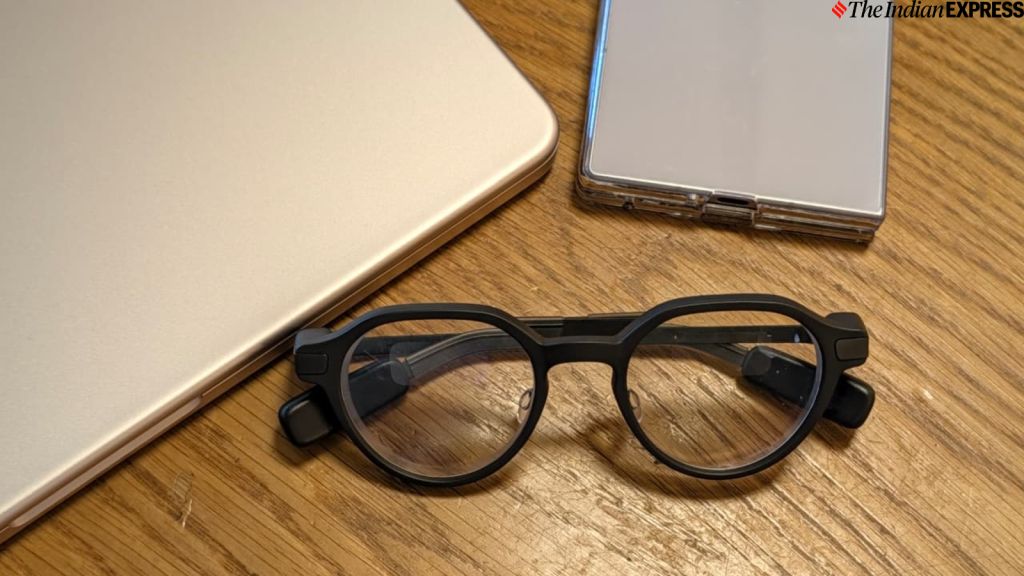
The first thing that stands out about the Even Realities G2 is how little it resembles conventional smart glasses. Rather than using thick frames to accommodate prominent cameras and other visible hardware, the G2 adopts a clean, understated design that looks closer to regular prescription eyewear.
The round lenses give the glasses a distinctive appearance reminiscent of the iconic eyewear associated with Apple co-founder Steve Jobs. Their minimalist styling makes them feel more like a fashion accessory than a gadget, and friends and colleagues may not immediately realise that the frames contain an electronic display.
The G2 is particularly appealing to people who prefer classic designs over oversized, attention-grabbing frames. Its restrained appearance also helps it fit into professional environments, including offices, meetings and presentations, where conspicuous technology might feel out of place.
Even Realities uses titanium and magnesium in the construction, keeping the glasses’ weight to approximately 40 grams. During extended wear, the lightweight design proved comfortable, with no noticeable fatigue or irritation during a full day of use.
The electronic components and touch controls are housed in capsules built into the temple tips. These sections contain much of the technology required to operate the glasses, while the overall frame maintains a relatively conventional appearance.
The G2 also carries an IP65 rating, meaning it is protected against dust and water jets under specified test conditions. This offers some protection against everyday exposure, including rain, but does not make the glasses suitable for swimming or submersion. Users should also avoid exposing them to high-pressure water.
Overall, the design is one of the G2’s strongest features. It demonstrates that smart glasses do not necessarily need to look bulky or overtly technological to accommodate useful digital functions.
Monochrome heads-up display is the G2’s biggest attraction
The defining feature of the Even Realities G2 is its integrated heads-up display. Instead of using a full-colour screen, the glasses project green monochrome visuals through waveguide optics, creating an image that appears within the user’s field of vision.
The display uses a micro-LED system with a resolution of 640 × 350 pixels, a 27.5-degree field of view and peak brightness of up to 1,200 nits. Its green text and graphics recall older monochrome computer displays, but the technology serves a different purpose: presenting short pieces of information without requiring users to look down at a phone.
The resolution may appear modest compared with modern smartphone screens. However, the G2 is not intended for watching videos or displaying complex graphics. Its strengths lie in readable text, brief notifications, navigation arrows, live captions and other information that can be understood quickly.
Waveguide optics direct the display into the user’s field of view. The result is a relatively discreet interface that can provide useful information without placing a conventional screen directly in front of the eyes.
Correct positioning is important. The glasses need to sit properly on the nose for the projected information to remain clear and comfortable to view. In the reviewer’s experience, customised glasses adjusted for their vision worked well without requiring frequent repositioning.
After setup through the companion app, users see a tile-based dashboard containing information such as the time, battery level, news, calendar updates and health data. The interface is designed around quick interactions rather than prolonged viewing.
This approach makes sense for a wearable display. Instead of trying to reproduce a smartphone screen, the G2 focuses on presenting only the information that is useful in a particular moment.
Touch controls work, but the interface needs refinement
The G2 uses touch-sensitive strips built into the temples for navigation. Users can tap and swipe to move between functions, expand information panels and return to the main dashboard. A double-tap can bring up the dashboard or put the display to sleep, depending on the current state.
The controls are relatively straightforward once users become familiar with them. However, learning the gestures takes some time, and the experience is not always consistent. During testing, occasional sluggishness meant that some taps had to be repeated before the glasses registered the intended action.
These shortcomings matter because smart glasses need to be easy to operate without distracting the wearer. A control system that requires repeated attempts can undermine the convenience of having information directly in the user’s field of vision.
Even Realities also sells the R1 ring separately for $249. The accessory provides similar tap-and-swipe controls through a ring worn on the finger, placing the interaction point closer to the thumb instead of behind the ear.
For users who frequently navigate the interface, the ring could offer a more natural way to control the glasses. However, it adds another expense to a product that already sits in the premium price category.
Even Realities app and software: Eight features to explore
The G2 connects to Android and iOS smartphones through the Even app using Bluetooth. The app supports setup and customisation, while the glasses display selected information through a dashboard and a series of dedicated functions.
The interface has a clean, minimalist aesthetic, with a visual style that may appeal to users who prefer simple technology products. It includes eight main functions: Notifications, Conversate, Teleprompt, Translate, Navigate, Even AI, Dashboard and Silent Mode.
Users can customise which functions appear on the dashboard and move between them using the temple controls. The display can also be adjusted to an angle between zero and 60 degrees, helping users position the information according to their preferences.
The monochrome interface is an important part of the experience. Rather than trying to reproduce a smartphone’s full-colour environment, the G2 uses a simplified design that works with its display limitations. This makes the interface feel more purposeful for quick glances at text and essential information.
The glasses are not a replacement for a smartphone, and they are not particularly useful for every task a phone performs. Their value comes from making selected activities easier without requiring users to take their phones out of their pockets.
Notifications: Convenient, but not for everyone
The G2 can display phone notifications while remaining connected to a smartphone throughout the day. This can be useful when a quick glance is enough to determine whether a message or alert needs attention.
However, notifications can also become a source of distraction. Users who prefer to concentrate on work, writing or conversations may find that displaying alerts in their field of vision interrupts rather than improves their routine.
The ability to customise the dashboard and use Silent Mode helps make the experience more flexible, but the usefulness of notifications ultimately depends on individual preferences.
Conversate: AI-powered conversation summaries
Conversate is among the most interesting features of the Even Realities G2. It transcribes conversations in real time and uses AI to generate summaries and provide relevant context. This can be useful during discussions, interviews, meetings and other situations in which remembering every detail is difficult.
In everyday conversations, live captioning was generally reliable during testing, although occasional transcription errors occurred. Technical terminology and product names were more challenging, which is an important limitation for professionals dealing with specialised subjects.
The feature can also generate contextual information based on what it hears. During one test involving a commercial for Apple’s HomeView, the system produced a historical explanation about the name French toast. However, AI-generated context should not automatically be treated as verified fact. Users should independently check claims when accuracy matters, particularly in professional reporting or technical discussions.
Even Realities has also introduced Prep Notes, which lets users upload documents before meetings. Relevant keywords and fact-checking cues can then appear on the display in real time, potentially helping users prepare for discussions without constantly consulting their phones or printed notes.
Despite its usefulness, Conversate raises a significant privacy consideration. The absence of a camera does not mean the glasses cannot capture sensitive information. Their microphones can pick up conversations, and the reviewer’s testing found that AI processing of transcripts could continue even when live captions and cues were switched off.
Users should therefore understand how audio is processed, what information is retained and which controls are available before using the feature around other people. In workplaces or private meetings, obtaining appropriate consent may also be necessary.
Teleprompt: A practical tool for presentations
The Teleprompt feature displays scrolling text in the user’s field of vision and follows the speaker’s voice. This makes it particularly useful for presentations, speeches and other situations in which a person needs to refer to prepared material while maintaining eye contact with an audience.
During testing, the feature performed well and demonstrated the practical value of a monochrome heads-up display. Instead of looking down at notes or repeatedly checking a phone, presenters can access their script through the glasses.
For executives, content creators, educators and professionals who regularly speak in front of an audience, this could be one of the G2’s most compelling applications.
Translate: Support for more than 33 languages
The Translate feature supports more than 33 languages, including Hindi. Translations were fast enough to follow natural conversations during the review, making the feature potentially useful for travel, multilingual meetings and everyday communication.
However, users must manually select the input and output languages through the app rather than relying on automatic language detection. This extra step makes the experience less seamless than it could be, especially when switching between languages frequently.
Translation quality can also vary with accents, background noise and the complexity of a conversation. The feature is best treated as an aid to communication rather than a guarantee of perfect interpretation.
Navigation and Even AI have limitations
The navigation interface displays a map, directional arrows and countdowns to upcoming turns. Although the presentation is easy to understand, the reviewer found the turn-by-turn directions less accurate than Google Maps.
This limits the feature’s usefulness for people who rely on precise navigation. The ability to see directions without repeatedly looking at a phone is appealing, but that convenience matters only when the guidance is dependable.
Even AI, the glasses’ built-in voice assistant, also produced mixed results. It sometimes misinterpreted requests and struggled to recognise or activate voice commands in noisy outdoor environments, despite the inclusion of four microphones.
These limitations suggest that the hardware is capable of supporting useful interactions, but the software still needs refinement. Better voice recognition and more reliable navigation would make the glasses more practical in everyday situations.
Even Hub expands the glasses with third-party apps
The Even Hub platform adds another dimension to the G2 by allowing developers to create and distribute applications using web technologies. These third-party integrations can expand the glasses beyond the functions supplied by the manufacturer.
Examples include Whoop Glance, which brings information from a WHOOP band to the display, and OcuClaw, which adds agentic AI capabilities. A Spotify Lyrics Finder app is also available, although the reviewer found that its music-identification function failed to recognise the songs tested.
The platform could become more valuable as developers build applications suited to a small, monochrome display. Health summaries, productivity tools and contextual information are potentially better suited to the G2 than apps that depend on complex graphics or prolonged interaction.
However, third-party availability alone does not guarantee a polished experience. The reliability of individual applications will depend on their implementation, ongoing development and compatibility with the glasses.
Privacy is a major advantage, but the G2 is not completely private
The lack of a camera is the most important distinction between the G2 and many camera-equipped smart glasses. Without a built-in camera, the device cannot take photographs or record video through an onboard imaging system.
This can make the glasses feel less intrusive in public spaces. People may be more comfortable interacting with someone wearing conventional-looking eyewear than with someone whose glasses could be recording them.
The design also changes the purpose of the device. Rather than centring the experience on capturing the world, the G2 focuses on displaying information, supporting conversations and helping users access digital tools discreetly.
However, camera-free does not mean risk-free. The microphones can capture conversations, and AI-powered features may process sensitive speech to generate captions and summaries. The reviewer also found that transcript processing could continue even when live captions and cues were disabled.
For privacy-conscious buyers, this distinction is essential. Before using Conversate or other AI functions, users should review the manufacturer’s current privacy policy, data-retention practices and available processing controls. They should also consider whether the people around them are comfortable with audio-based transcription.
The G2’s privacy advantage is therefore best understood as a reduction in certain risks rather than a guarantee that no personal information will be collected or processed.
Battery life: Up to two days with typical use
Battery life is another area in which the Even Realities G2 performed well during the review. The glasses delivered approximately two days of typical use, although more demanding features reduced that figure substantially.
Using navigation, Conversate and applications from Even Hub brought estimated battery life down to roughly 12 to 15 hours. The difference shows how workloads involving continuous display activity, microphones and AI processing can affect endurance.
The charging case provides around seven additional full charges, reducing the need to find a power outlet frequently. This is useful for people who want to wear the glasses throughout the day or travel with them.
Actual battery life will vary according to usage patterns, feature settings and connection conditions. Buyers who expect to use AI transcription and navigation continuously should plan around the shorter estimate rather than assuming they will always get two days between charges.
Even Realities G2 price: Is $599 worth it?
The Even Realities G2 is priced at $599, approximately Rs 57,004 according to the original review. Buyers who need prescription lenses must pay an additional $150, bringing the quoted total to around $750 before any applicable taxes, shipping or other charges.
That puts the G2 firmly in the premium category. Buyers are paying not only for the frames but also for the integrated display, AI features, companion software and a design that avoids the prominent cameras found on many competing products.
The original review compared the G2 with Meta Ray-Ban glasses, which were described as costing roughly half as much but lacking a built-in display. It also cited a Meta Ray-Ban display-equipped model priced at $799, while noting limitations around prescription-lens availability for that product. Prices, configurations and prescription options can vary by model and market, so buyers should check current official listings before making a comparison.
The separately sold $249 R1 ring adds another potential expense for users who want a different control method. Although it may improve everyday interaction, it is not essential to every user’s experience.
For buyers who primarily want to take photos, record videos or listen to audio, the G2 may not offer the functions they value most. Its appeal lies instead in discreet information access, conversation assistance, translation and teleprompting.
Even Realities G2 review: Pros and cons
What works well
- Minimalist, conventional-looking design that does not immediately reveal its smart features.
- Lightweight titanium and magnesium construction weighing approximately 40 grams.
- Camera-free design that reduces concerns associated with wearable photography and video recording.
- Monochrome heads-up display suited to text, notifications and navigation cues.
- Useful Conversate and Teleprompt features for meetings and presentations.
- Support for translation across more than 33 languages, including Hindi.
- Strong battery endurance under typical usage conditions, supported by a charging case.
What could be better
- Premium starting price, with additional costs for prescription lenses and optional accessories.
- Occasional sluggishness in the temple touch controls.
- AI transcription can make mistakes, especially with technical terms and product names.
- Navigation was less reliable than Google Maps during testing.
- Voice commands may be misinterpreted in noisy environments.
- Third-party apps can be inconsistent in performance.
- Microphone-based transcription and AI processing still raise privacy questions.
Should you buy the Even Realities G2 smart glasses?
The Even Realities G2 is not a product for everyone, and its price makes it difficult to recommend as an everyday accessory for the average smartphone user. It does not replace a phone, and several of its features still need improvement before they can become indispensable.
However, the G2 offers a compelling combination of discreet design, a practical monochrome display and useful productivity tools. Its camera-free approach will appeal to people who want wearable technology without the social concerns associated with recording devices. The Teleprompt feature is particularly useful for presenters, while Conversate may help professionals who need to review meetings or capture key discussion points.
The device is best suited to technology enthusiasts, professionals, designers, executives and other users who can identify specific daily tasks that benefit from a heads-up display. Those who mainly want a low-cost way to receive notifications or listen to music may find better value elsewhere.
For privacy-conscious buyers, the key consideration is that removing the camera reduces one category of risk but does not eliminate the privacy implications of microphones and AI-powered transcription. Understanding how those features work is as important as evaluating the hardware.
Ultimately, the Even Realities G2 offers an intriguing vision of smart glasses that look ordinary while providing genuinely useful digital assistance. Its combination of comfort, restrained styling and focused software makes it a promising wearable, even if its high price and uneven features mean it remains a product for enthusiasts rather than the mass market.
For breaking news and live news updates, like us on Facebook or follow us on Twitter and Instagram. Read more on Latest Technology on thefoxdaily.com.





COMMENTS 0